






















We have shown many scanning tools where you can gather a lot of information about your target, in an Internal network or a few external networks. There are many individual ethical hacking security researchers in the International Institute of Cyber Security who use such tools or manual analysis methods to collect information about victims. Many recent attacks show how these open-source tools are used in gathering information.
Different scenario needs different tools. Most of the scanning is done on ports like – Port 80, 443, or other common network services. Such attacks are done by using public resources. These attacks are most common nowadays. Large Tech companies that use IDS/ IPS or strong firewalls to secure their networks are often compromised using customized open-source methods/ tools. We scanned our local network to gather information on the hosts. Today we will show you Kali Inbuilt tools.
Arping is designed to send ARP or ICMP requests to specified hosts & display replies. The host may be determined by its hostname or its IP address. Each request is sent per second. ARP & ICMP are part of the Internet protocol. According to ethical hacking researcher at the International Institute of Cyber Security ARP is used to map IPv4 addresses with MAC addresses & ICMP is used to send error info to connected IP addresses when packets are not delivered and for other purposes. Now we will gather information with arping.
- For testing, we are using Kali Linux 2019.1 amd64. Hence, arping comes pre-installed, open terminal type arping –help
root@kali:~/Downloads# arping --help
 ARPing 2.19, by Thomas Habets [email protected]
 usage: arping [ -0aAbdDeFpPqrRuUv ] [ -w  ] [ -W  ] [ -S  ]
               [ -T  ] [ -t  ] [ -c  ]
               [ -C  ] [ -i  ] [ -m  ] [ -g  ]
               [ -V  ] [ -Q  ]
- The above help menu is used in arping.
NOTE: FOR SECURITY WE HAVE MASKED THE GATHERED MAC ADDRESSES.
PING HOST USING ARP PACKETS:-
- Type arping 192.168.1.3
- 192.168.1.3 is the target IPv4.
root@kali:~/Downloads# arping 192.168.1.3
 ARPING 192.168.1.3
 42 bytes from 0#:##:17:##:##:#0 (192.168.1.3): index=0 time=118.068 msec
 42 bytes from 0#:##:17:##:##:#0 (192.168.1.3): index=1 time=40.460 msec
 42 bytes from 0#:##:17:##:##:#0 (192.168.1.3): index=2 time=61.031 msec
 42 bytes from 0#:##:17:##:##:#0 (192.168.1.3): index=3 time=83.548 msec
- The above query has gathered around 42 bytes of data reply from 192.168.1.3 of around 40-120 msec.
- The above output shows the MAC address of the target. Results show that targets are vulnerable to arping which can be used in other attacking methods.
PING HOST USING SPECIFIC INTERFACE WITH CERTAIN REQUEST:-
- Type arping -i wlan0 -c8 192.168.1.3 -vv
- -i is used to enter network interface.
- -c is used to count send requests. Here 8 requests will be sent.
- 192.168.1.3 is the target IP address.
- -vv is used for verbose mode.
root@kali:~/Downloads# arping -i wlan0 -c8 192.168.1.3 -vv
 arping: clock_getres() = 0s 1ns
 arping: libnet_init(wlan0)
 arping: libnet_init(wlan0)
 Timestamp types:
   Name               Description
 arping: Successfully chrooted to /run/sshd
 arping: Successfully dropped uid/gid to 65534/65534.
 arping: pcap_get_selectable_fd(): 4
 This box:   Interface: wlan0  IP: 192.168.1.4   MAC address: b#:##:##:3#:##:##
 ARPING 192.168.1.3
 arping: sending packet at time 3003.792576155
 42 bytes from 0#:##:##:00:##:b# (192.168.1.3): index=0 time=50.523 msec
 arping: sending packet at time 3004.793923502
 42 bytes from 0#:##:##:00:##:b# (192.168.1.3): index=1 time=73.002 msec
 arping: sending packet at time 3007.797879408
 42 bytes from 0#:##:##:00:##:b# (192.168.1.3): index=4 time=38.618 msec
 arping: sending packet at time 3008.799252107
 42 bytes from 0#:##:##:00:##:b# (192.168.1.3): index=5 time=61.192 msec
 --- 192.168.1.3 statistics ---
 8 packets transmitted, 8 packets received,   0% unanswered (0 extra)
 rtt min/avg/max/std-dev = 38.618/78.477/118.228/25.969 ms
- In the above output, arping has sent packets in milli seconds of 42 bytes to the target. The above request has gathered the MAC addresses of the target with a certain no. of requests.
BROADCAST TARGET IP ADDRESS ARP CACHE:-
- Type arping -U 192.168.1.3
- -U is used to send unsolicited ARP.
- 192.168.1.3 is target IPv4.
root@kali:~/Downloads# arping -U 192.168.1.3
 ARPING 192.168.1.3
 42 bytes from 0#:e#:##:00:##:#0 (192.168.1.3): index=0 time=80.594 msec
 42 bytes from 0#:e#:##:00:##:#0  (192.168.1.3): index=1 time=103.256 msec
 42 bytes from 0#:e#:##:00:##:#0  (192.168.1.3): index=2 time=25.452 msec
 42 bytes from 0#:e#:##:00:##:#0  (192.168.1.3): index=3 time=46.234 msec
 42 bytes from 0#:e#:##:00:##:#0  (192.168.1.3): index=4 time=3.548 msec
 42 bytes from 0#:e#:##:00:##:#0  (192.168.1.3): index=5 time=91.538 msec
 42 bytes from 0#:e#:##:00:##:#0  (192.168.1.3): index=6 time=115.317 msec
 ^C
 --- 192.168.1.3 statistics ---
 7 packets transmitted, 7 packets received,   0% unanswered (0 extra)
 rtt min/avg/max/std-dev = 3.548/66.563/115.317/38.947 ms
- The above query has sent the ARP update to neighbor ARP caches. With a response of 42 bytes. The above query shows that the cache has been updated.
- To check if a cache has been updated, you can do arp -a in the command prompt. As we have found using an IP address on which the OS target machine is running.
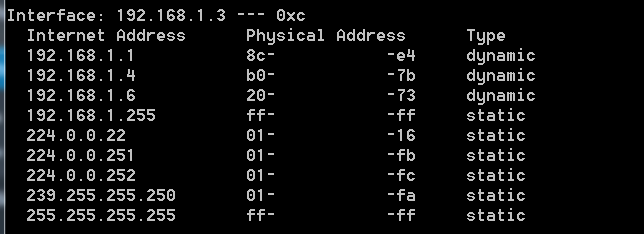
- In the above screenshot, the Target (192.168.1.3) ARP cache has been updated. As attacker’s IP address was (192.168.1.4) which is found in the list of arp cache of the target machine.
