






















OSINT (Open Source Intelligence) is a way to collect data from public sources. There are many tools & techniques that are capable of gathering information from public sources are the part of ethical hacking classes of International Institute of Cyber Security (IICS). Basically before attacking, there is always a need to collect information about your target. So gathering different domains, sub-domains, open ports, services & other details. According to ethical hacking researcher of international institute of cyber security (IICS), Different search engines such as – shodan, and censys are used in scanning/ reconnaissance.
Today we came up with another OSINT tool that is used in gathering information. Commonly, OSINT tools are used for threat intelligence or cyber investigations. OSINT search Description is a small Python script used in extracting data using different search engines & different developers' API keys. A Python script that is designed to search for public email addresses, domains, and phone numbers.
OSINT FUNCTIONALITY OFFERS:-
- Find personal information such as – name, gender, GPS location, age, languages, social network profiles, etc…
- Find information related to data breaches.
- Find which country a phone number belongs.
- Find results of Google hacking techniques.
- Find results related to domains or IP addresses.
- Find digital certificates for a certain domain.
- Find CMS for a certain website.
- Find DNS Records and zone transfer information for a certain domain.
- Find a Facebook ID and a Facebook page full of photos after getting a Facebook profile URL.
- Find URLs present in some web pages.
- Find a URL to know what torrents are being downloaded from some IP.
INSTALLATION OF OSINT SEARCH DESCRIPTION:-
- For testing Kali Linux 2019.1 amd64 is used. The tool was tested on a Live boot of Kali Linux 2019.1 amd64.
- Before installation of OSINT search. Make sure python3 is installed. For installing Python type sudo apt-get update & sudo apt-get install python3 As the tool runs on python3.
- If python3 is installed. Type sudo apt-get install python3-dev
root@kali:~/Downloads# apt-get update
 Get:1 http://ftp.yzu.edu.tw/Linux/kali kali-rolling InRelease [30.5 kB]
 Get:2 http://ftp.yzu.edu.tw/Linux/kali kali-rolling/main Sources [12.8 MB]
 e amd64 Packages [187 kB]
 Fetched 30.4 MB in 14s (2,120 kB/s)
 Reading package lists… Done

root@kali:~/Downloads# apt-get install python3
 Reading package lists… Done
 Building dependency tree
 Reading state information… Done
 The following packages were automatically installed and are no longer required:
   libpython3.6 libpython3.6-dev python3.6-dev
 Use 'apt autoremove' to remove them.
 The following additional packages will be installed:
   libpython3-dev libpython3-stdlib libpython3.7 libpython3.7-dev libpython3.7-minimal libpython3.7-stdlib python3-dev
   python3-distutils python3-minimal python3.7 python3.7-dev python3.7-minimal
 Suggested packages:
   python3-doc python3-tk python3-venv python3.7-venv python3.7-doc
 The following NEW packages will be installed:
   libpython3.7-dev python3.7-dev
- So install the pip3 version. For that type sudo apt-get install python3-pip
- Type git clone https://github.com/am0nt31r0/OSINT-Search.git
root@kali:~/Downloads# git clone https://github.com/am0nt31r0/OSINT-Search.git
 Cloning into 'OSINT-Search'…
 remote: Enumerating objects: 30, done.
 remote: Counting objects: 100% (30/30), done.
 remote: Compressing objects: 100% (30/30), done.
 remote: Total 171 (delta 8), reused 0 (delta 0), pack-reused 141
 Receiving objects: 100% (171/171), 61.15 KiB | 279.00 KiB/s, done.
 Resolving deltas: 100% (55/55), done.
- Type cd OSINT-Search & type chmod u+x requirements.txt & type chmod u+x osintS34rCh.py
- Type ls- ltr for checking permissions.
root@kali:~/Downloads# cd OSINT-Search/
root@kali:~/Downloads/OSINT-Search# chmod u+x requirements.txt
root@kali:~/Downloads/OSINT-Search# chmod u+x osintS34rCh.py
root@kali:~/Downloads/OSINT-Search# ls -ltr
 total 52
 -rwxr--r-- 1 root root   145 May  1 05:05 requirements.txt
 -rw-r--r-- 1 root root  4317 May  1 05:05 README.md
 -rwxr--r-- 1 root root 40432 May  1 05:05 osintS34rCh.py
- Type pip3 install -r requirements.txt
root@kali:~/Downloads/OSINT-Search# pip3 install -r requirements.txt
 Collecting git+https://github.com/abenassi/Google-Search-API (from -r requirements.txt (line 3))
   Cloning https://github.com/abenassi/Google-Search-API to /tmp/pip-req-build-f4j93eyc
 Collecting validate_email (from -r requirements.txt (line 1))
   Downloading https://files.pythonhosted.org/packages/84/a0/cb53fb64b52123513d04f9b913b905f3eb6fda7264e639b4573cc715c29f/validate_email-1.3.tar.gz
 Collecting opencnam (from -r requirements.txt (line 2))
   Downloading https://files.pythonhosted.org/packages/25/cc/b3bdfedabcf0d0b9b2438dd00d1f65ca8d2d691ba24030cc544a6a0114e8/opencnam-0.6-py3-none-any.whl
 Collecting pyfiglet (from -r requirements.txt (line 4))
   Downloading https://files.pythonhosted.org/packages/33/07/fcfdd7a2872f5b348953de35acce1544dab0c1e8368dca54279b1cde5c15/pyfiglet-0.8.post1-py2.py3-none-any.whl (865kB)
     100% |████████████████████████████████| 870kB 908kB/s
- Type pip3 install git+https://github.com/abenassi/Google-Search-API –upgrade
root@kali:~/Downloads/OSINT-Search# pip3 install git+https://github.com/abenassi/Google-Search-API --upgrade
 Collecting git+https://github.com/abenassi/Google-Search-API
   Cloning https://github.com/abenassi/Google-Search-API to /tmp/pip-req-build-b5sd1rin
 Requirement already satisfied, skipping upgrade: beautifulsoup4 in /usr/lib/python3/dist-packages (from Google-Search-API==1.1.14) (4.6.3)
 Requirement already satisfied, skipping upgrade: fake-useragent in /usr/local/lib/python3.7/dist-packages (from Google-Search-API==1.1.14) (0.1.11)
 Requirement already satisfied, skipping upgrade: future in /usr/lib/python3/dist-packages (from Google-Search-API==1.1.14) (0.15.2)
 Requirement already satisfied, skipping upgrade: requests in /usr/lib/python3/dist-packages (from Google-Search-API==1.1.14) (2.20.0)
 Requirement already satisfied, skipping upgrade: selenium<3.0.0,>=2.44.0 in /usr/local/lib/python3.7/dist-packages (from Google-Search-API==1.1.14) (2.53.6)
- Type pip3 install https://github.com/PaulSec/API-dnsdumpster.com/archive/master.zip –user
root@kali:~/Downloads/OSINT-Search# pip3 install https://github.com/PaulSec/API-dnsdumpster.com/archive/master.zip --user
 Collecting https://github.com/PaulSec/API-dnsdumpster.com/archive/master.zip
   Downloading https://github.com/PaulSec/API-dnsdumpster.com/archive/master.zip
      \ 266kB 21.3MB/s
 Collecting bs4 (from dnsdumpster==0.5)
   Downloading https://files.pythonhosted.org/packages/10/ed/7e8b97591f6f456174139ec089c769f89a94a1a4025fe967691de971f314/bs4-0.0.1.tar.gz
 Requirement already satisfied: requests in /usr/lib/python3/dist-packages (from dnsdumpster==0.5) (2.20.0)
- Type python3 osintS34rCh.py
root@kali:~/Downloads/OSINT-Search# python3 osintS34rCh.py
              _       __  __________ __ __       ________
  ____  _____(_)___  / /_/ ___/__  // // / _____/ ____/ /_
 / __ \/ ___/ / __ \/ __/\__ \ /_ </ // /_/ ___/ /   / __ \
/ /_/ (__  ) / / / / /_ ___/ /__/ /__  __/ /  / /___/ / / /
\____/____/_/_/ /_/\__//____/____/  /_/ /_/   \____/_/ /_/
[-] The following procedure is necessary in order to save your API keys…
[-] Hit enter if you don't have the keys.
[-] The data will be written into a file called [/osintSearch.config.ini] that can be edited by you after.
[?] What is your PIPL API key?
- Now from here, enter the API keys that are required from the following URLs.
- Create an account in each following URLs & copy their APIs into the required field of osintS34rCh.py
https://pipl.com/api
https://www.opencnam.com
https://www.shodan.io
https://whatcms.org/API
https://censys.io/register
https://dashboard.fullcontact.com/consents
- After copying type python3 osintS34rCh.py
[?] What is your PIPL API key?
 gm#####################yj9
 [?] What is your FullContact API key?
 Uh############H9rPOez###########sz
 [?] What is your CNAM SID?
 AC1##############88d73e0##########
 [?] What is your CNAM AUTH_TOKEN?
 A###############c403d9############fe5
 [?] What is your Shodan API key?
 a###############wlcjD###################rM
 [?] What is your WhatCMS API key?
 2##########################ac5376ef9f2d##################ce2c40#######d2
 [?] What is your Censys API id?
 6#######8-####-4723-####-#########bc4e
 [?] What is your Censys API secret?
 ###############2HyMxEOYrY##############
 [?] What is your TowerData API key?
 c6###################3b09a0############aa8a
- Type python3 osintS34rCh.py -h
 root@kali:~/Downloads/OSINT-Search# python3 osintS34rCh.py -h
 osintS34rCh v1.0
USAGES
   Email
   ./osintS34rCh -e                                # All Searches: Pipl, FullContact, Haveibeenpwnded Data Breaches and Credentials Pastes, TowerData - validate e-mail
   ./osintS34rCh -e  --pipl                        # Pipl

Domain
   ./osintS34rCh.py -t                                   # All Searches: Shodan Recon, crt.sh, DNSDumpster, All Google Hacking Dorks, HackerTarget - DNS Zonetransfer
   ./osintS34rCh.py -t  --shodan                         # Shodan Recon

IP
   ./osintS34rCh.py -t                                       # All Searchs: Shodan and Censys Recon
   ./osintS34rCh.py -t  --shodan                             # Shodan Recon

URL
   ./osintS34rCh.py -u                                      # WhatCMS Check, HackerTarget - Extract URLs
   ./osintS34rCh.py -u  --cms                               # WhatCMS Check

URL
   ./osintS34rCh.py -u                                      # WhatCMS Check, HackerTarget - Extract URLs
   ./osintS34rCh.py -u  --cms                               # WhatCMS Check
FIND EMAIL IDS
- Type python3 osintS34rCh.py -e abh#########a6##@gmail.com –pwned
- -e is used to search for information about emails.
- abh#########a6##@gmail.com is the target email id. For security, we have hidden the email ID and this email ID is created specifically for cyber forensics classes at International Institute of Cyber Security.
- –pwned is a query to search for if there is any data breach.
root@kali:~/Downloads/OSINT-Search# python3 osintS34rCh.py -e abh##########a6##@gmail.com --pwned
              _       __  __________ __ __       ________
  ____  _____(_)___  / /_/ ___/__  // // / _____/ ____/ /_
 / __ \/ ___/ / __ \/ __/\__ \ /_ </ // /_/ ___/ /   / __ \
/ /_/ (__  ) / / / / /_ ___/ /__/ /__  __/ /  / /___/ / / /
\____/____/_/_/ /_/\__//____/____/  /_/ /_/   \____/_/ /_/
-> Data Breaches Results
[@] Target: abh###########a6##@gmail.com
[] Data breach: Digimon [] Title: Digimon
[] Domain: digimon.co.in [] Date of the breach: 2016-09-05
[] Number of accounts breached: 7687679 [] Description: In September 2016, over 16GB of logs from a service indicated to be digimon.co.in were obtained, most likely from an unprotected Mongo DB instance. The service ceased running shortly afterwards and no information remains about the precise nature of it. Based on enquiries made via Twitter, it appears to have been a mail service possibly based on PowerMTA and used for delivering spam. The logs contained information including 7.7M unique email recipients (names and addresses), mail server IP addresses, email subjects and tracking information including mail opens and clicks.
[] Logo image from Digimon: https://haveibeenpwned.com/Content/Images/PwnedLogos/Email.png [] Data breached: Email addresses
[] Data breached: Email messages [] Data breached: IP addresses
[*] Data breached: Names
[] Data breach: Dubsmash [] Title: Dubsmash
[] Domain: dubsmash.com [] Date of the breach: 2018-12-01
[] Number of accounts breached: 161749950 [] Description: In December 2018, the video messaging service Dubsmash suffered a data breach. The incident exposed 162 million unique email addresses alongside usernames and PBKDF2 password hashes. In 2019, the data appeared listed for sale on a dark web marketplace (along with several other large breaches) and subsequently began circulating more broadly. The data was provided to HIBP by a source who requested it to be attributed to "[email protected]".
[] Logo image from Dubsmash: https://haveibeenpwned.com/Content/Images/PwnedLogos/Dubsmash.png [] Data breached: Email addresses
[] Data breached: Geographic locations [] Data breached: Names
[] Data breached: Passwords [] Data breached: Phone numbers
[] Data breached: Spoken languages [] Data breached: Usernames
[] Data breach: MySpace [] Title: MySpace
[] Domain: myspace.com [] Date of the breach: 2008-07-01
[] Number of accounts breached: 359420698 [] Description: In approximately 2008, MySpace suffered a data breach that exposed almost 360 million accounts. In May 2016 the data was offered up for sale on the "Real Deal" dark market website and included email addresses, usernames and SHA1 hashes of the first 10 characters of the password converted to lowercase and stored without a salt. The exact breach date is unknown, but analysis of the data suggests it was 8 years before being made public.
[] Logo image from MySpace: https://haveibeenpwned.com/Content/Images/PwnedLogos/MySpace.png [] Data breached: Email addresses
[] Data breached: Passwords [] Data breached: Usernames
[] Data breach: Tumblr [] Title: tumblr
[] Domain: tumblr.com [] Date of the breach: 2013-02-28
[] Number of accounts breached: 65469298 [] Description: In early 2013, tumblr suffered a data breach which resulted in the exposure of over 65 million accounts. The data was later put up for sale on a dark market website and included email addresses and passwords stored as salted SHA1 hashes.
[] Logo image from Tumblr: https://haveibeenpwned.com/Content/Images/PwnedLogos/Tumblr.png [] Data breached: Email addresses
[*] Data breached:Passwords
- The above output shows, that there are 3 data breaches with the above email ID. The first one is the DUBMASH messaging application.
- A video messaging application experienced a data breach in December 2018 with over 162 million of emails. Later on, data containing usernames & password hashes were sold on the dark web.
- The second is a way old but effective data breach on Myspace. Myspace is a popular social networking site that offers photos, music, videos, and user submissions of network friends. As per the above data breach, this site data was also found on sale in the REAL DARK website. Including usernames, passwords hashes, and addresses.
- Third is the Tumblr breach where it suffered of data breach of around 65 million which was on sale on the dark market.
FIND HOSTS, PUBLIC KEYS OF TARGET
- Type python3 osintS34rCh.py -t certifiedhacker.com
- -t is used for searching for information related to the domain.
- certifiedhacker.com is the target site.
root@kali:~/Downloads/OSINT-Search# python3 osintS34rCh.py -t certifiedhacker.com
              _       __  __________ __ __       ________
  ____  _____(_)___  / /_/ ___/__  // // / _____/ ____/ /_
 / __ \/ ___/ / __ \/ __/\__ \ /_ </ // /_/ ___/ /   / __ \
/ /_/ (__  ) / / / / /_ ___/ /__/ /__  __/ /  / /___/ / / /
\____/____/_/_/ /_/\__//____/____/  /_/ /_/   \____/_/ /_/
-> Shodan Results
-> Shodan Results
[@] Target: certifiedhacker.com
[!] Shodan: information about certifiedhacker.com was not found.
-> CRT.sh Results
[@] Target: certifiedhacker.com
[-] URL: https://crt.sh/?q=%25certifiedhacker.com
[] Issuer CA ID: 16418 [] Issuer Name: C=US, O=Let's Encrypt, CN=Let's Encrypt Authority X3
[] Name: events.certifiedhacker.com [] Logged At: 2019-03-07T17:07:30.61
[] Not before: 2019-03-07T16:07:29 [] Not after: 2019-06-05T16:07:29
[] Issuer CA ID: 16418 [] Issuer Name: C=US, O=Let's Encrypt, CN=Let's Encrypt Authority X3
[] Name: fleet.certifiedhacker.com [] Logged At: 2019-03-07T17:07:30.61
[] Not before: 2019-03-07T16:07:29 [] Not after: 2019-06-05T16:07:29
[] Issuer CA ID: 16418 [] Issuer Name: C=US, O=Let's Encrypt, CN=Let's Encrypt Authority X3
[] Name: iam.certifiedhacker.com [] Logged At: 2019-03-07T17:07:30.61
[] Not before: 2019-03-07T16:07:29 [] Not after: 2019-06-05T16:07:29
-> DNSdumpster Results
[@] Target: certifiedhacker.com
[*] DNS Servers
Domain: ns2.bluehost.com.
IP: 162.159.25.175
Reverse DNS: ns2.bluehost.com
AS: AS13335
ISP: Cloudflare Inc
Country: United States
Header:
Domain: ns1.bluehost.com.
IP: 162.159.24.80
Reverse DNS: ns1.bluehost.com
AS: AS13335
ISP: Cloudflare Inc
Country: United States
Header:
[*] MX Records
Domain: 0 mail.certifiedhacker.com.
IP: 162.241.216.11
Reverse DNS: box5331.bluehost.com
AS: AS20013
ISP: CyrusOne LLC
Country: United States
Header: mail.certifiedhacker.com.
[*] TXT Records
"v=spf1 a mx ptr include:bluehost.com ?all"
[*] Host Records
Domain: soc.certifiedhacker.com
IP: 162.241.216.11
Reverse DNS: box5331.bluehost.com
AS: AS20013
ISP: CyrusOne LLC
Country: United States
Header: nginx/1.12.2HTTPS: nginx/1.12.2FTP: 220---------- Welcome to Pure-FTPd [privsep] [TLS] ----------//220-You are user number 1 of 150 allowed.//220-Local time is now 23:54. Server port: 21.//220-IPv6 connections are also welcome on this server.//220 You will be disconnected after 15 minutes of inactivity.//SSH: SSH-2.0-OpenSSH_5.3TCP8080: nginx/1.12.2
Domain: www.soc.certifiedhacker.com
IP: 162.241.216.11
Reverse DNS: box5331.bluehost.com
AS: AS20013
ISP: CyrusOne LLC
Country: United States
Header: nginx/1.12.2HTTPS: nginx/1.12.2FTP: 220---------- Welcome to Pure-FTPd [privsep] [TLS] ----------//220-You are user number 1 of 150 allowed.//220-Local time is now 23:54. Server port: 21.//220-IPv6 connections are also welcome on this server.//220 You will be disconnected after 15 minutes of inactivity.//SSH: SSH-2.0-OpenSSH_5.3TCP8080: nginx/1.12.2
Domain: itf.certifiedhacker.com
IP: 162.241.216.11
Reverse DNS: box5331.bluehost.com
AS: AS20013
ISP: CyrusOne LLC
Country: United States
Header: nginx/1.12.2HTTPS: nginx/1.12.2FTP: 220---------- Welcome to Pure-FTPd [privsep] [TLS] ----------//220-You are user number 1 of 150 allowed.//220-Local time is now 23:54. Server port: 21.//220-IPv6 connections are also welcome on this server.//220 You will be disconnected after 15 minutes of inactivity.//SSH: SSH-2.0-OpenSSH_5.3TCP8080: nginx/1.12.2
-> Zone Transfer Results
; <<>> DiG 9.11.3-1ubuntu1.7-Ubuntu <<>> axfr @ns2.bluehost.com certifiedhacker.com
; (1 server found)
;; global options: +cmd
; Transfer failed.
; <<>> DiG 9.11.3-1ubuntu1.7-Ubuntu <<>> axfr @ns1.bluehost.com certifiedhacker.com
; (1 server found)
;; global options: +cmd
; Transfer failed.
- The above output shows Shodan was unable to find everything about the target site. Then Crt.sh finds the URLs same as the target site. Crt.sh shows the domains & sub-domains of the target website. Crt.sh (Certificate Transparency) is developed to increase the security of the public keys.
- When we open the first link from crt.sh. It shows associated links the same as the target site(certified hacker.com)
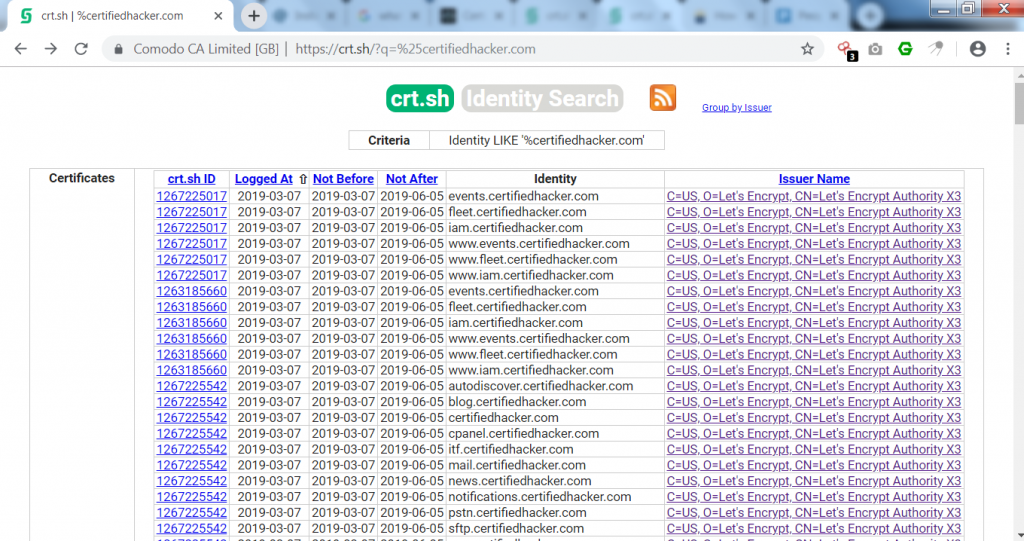
- The above link shows the same link as certifiedhacker.com. Opening the first link shows the public key of the URL with the common name of Let’s encrypt authority.
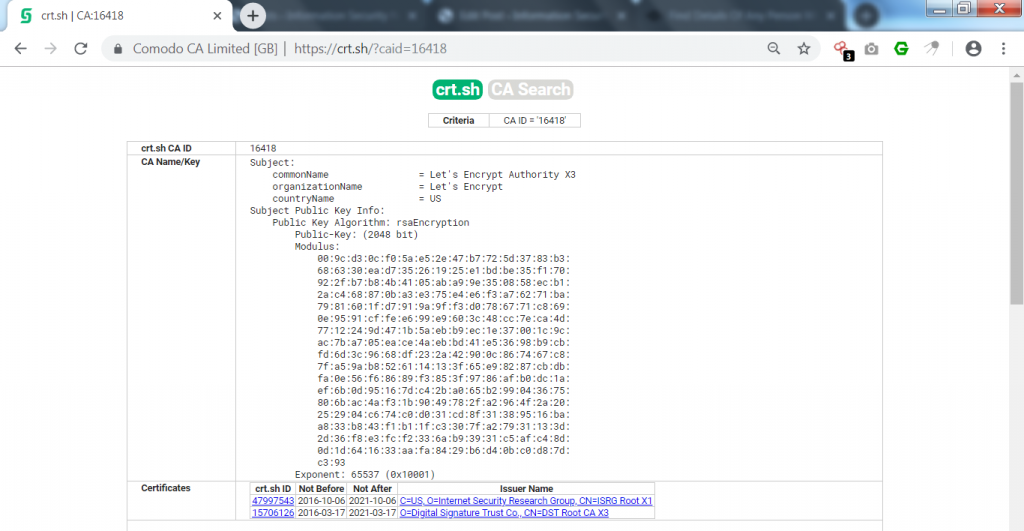
————————————————–SNIP———————————————
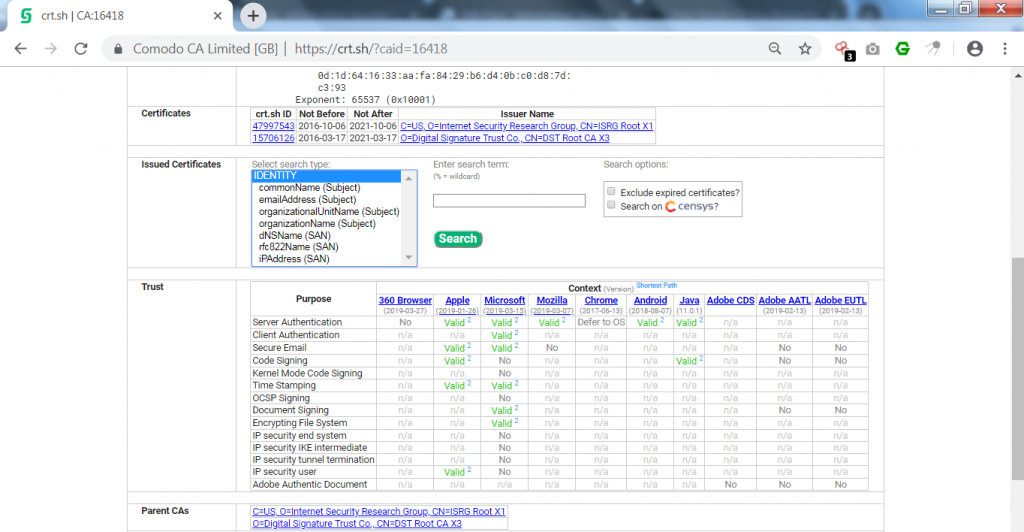
- Further, it shows issued certificates on the URL. Then it shows the authentication of the URL. Valid shows that the browser has passed the authentication on every purpose.
- Most of the URLs in crt.sh show the same authentications.
- DNSdumpster is designed to search for discovered hosts related to domains. DNSdumpster finds all the visible hosts for the attackers.
- In the above output, Dnsdumpster has gathered 5 host records & other domains of the target site. There are numerous ways to gather hosts of any domain. We have shown how NSLOOKUP is used in gathering different hosts.
- Then it shows the different domains of the target site containing reverse DNS, country, IP address, ISP & header of DNS.
- The above output of OSINT search has gathered different records which can be used in further scanning methods.
- Then it shows the name of the server in zone transfer but was unable to transfer any part of the file.
FINDING OPEN PORTS
- Type python3 osintS34rCh.py -t 162.241.216.11
- -t is used to enter the IP address.
- 162.241.216.11 is the target IP address.
root@kali:~/Downloads/OSINT-Search# python3 osintS34rCh.py -t 162.241.216.11
              _       __  __________ __ __       ________
  ____  _____(_)___  / /_/ ___/__  // // / _____/ ____/ /_
 / __ \/ ___/ / __ \/ __/\__ \ /_ </ // /_/ ___/ /   / __ \
/ /_/ (__  ) / / / / /_ ___/ /__/ /__  __/ /  / /___/ / / /
\____/____/_/_/ /_/\__//____/____/  /_/ /_/   \____/_/ /_/
-> Shodan Results
[@] Target: 162.241.216.11
[] City: Provo [] Country: United States
[] Postal Code: 84606 [] Longitude: -111.6133
[] Latitude: 40.21809999999999 [] Operation System: None
[] Organization: CyrusOne LLC [] ISP: Unified Layer
[] Port: 465 [] Port: 443
[] Port: 2096 [] Port: 8080
[] Port: 995 [] Port: 993
[] Port: 22 [] Port: 587
[] Port: 53 [] Port: 25
[] Port: 80 [] Port: 2222
[] Port: 2087 [] Port: 5432
[] Port: 2082 [] Port: 2083
[] Port: 26 [] Hostname: box5331.bluehost.com
-> Censys Results
[] IP: 162.241.216.11 [] Protocol: 80/http
[] Protocol: 3306/mysql [] Protocol: 8080/http
[] Protocol: 993/imaps [] Protocol: 465/smtp
[] Protocol: 995/pop3s [] Protocol: 110/pop3
[] Protocol: 21/ftp [] Protocol: 143/imap
[] Protocol: 53/dns [] Protocol: 587/smtp
[] Protocol: 443/https [] Protocol: 22/ssh
[] Protocol: 5432/postgres [] Country: United States
[] Registered Country: United States [] Longitude: -111.6442
[] Latitude: 40.2342 [] Continent: North America
[] Timezone: America/Denver [] AS Name: UNIFIEDLAYER-AS-1 - Unified Layer
[] AS Country Code: US [] AS Description: UNIFIEDLAYER-AS-1 - Unified Layer
[] Service: https/443 [] Certificate DNS Names: ['.bluehost.com', 'bluehost.com'] [] Issued By: {'common_name': ['COMODO RSA Domain Validation Secure Server CA'], 'country': ['GB'], 'locality': ['Salford'], 'province': ['Greater Manchester'], 'organization': ['COMODO CA Limited']}
[] Service: dns/53 [] Open Resolver: True
[*] Lookup Answers: {'type': 'A', 'name': 'c.afekv.com', 'response': '162.241.216.11'}
[*] Updated at: 2019-05-01T08:18:45+00:00
- The above output shows open ports from Shodan containing registered countries with longitude & latitude.
- Shodan has found open ports of the target site. Some ports that are found with common vulnerabilities can be used in further footprinting methods.
- Censys has also found commonly listed ports that are used in information-gathering methods.
- These techniques are the curriculum of ethical hacking classes at International Institute of Cyber Security.
EXTRACTING URLS
- Type python3 osintS34rCh.py -u certifiedhacker.com
- -u is used to enter the domain name.
- certifiedhacker.com is a target domain name.
root@kali:~/Downloads/OSINT-Search# python3 osintS34rCh.py -u certifiedhacker.com
              _       __  __________ __ __       ________
  ____  _____(_)___  / /_/ ___/__  // // / _____/ ____/ /_
 / __ \/ ___/ / __ \/ __/\__ \ /_ </ // /_/ ___/ /   / __ \
/ /_/ (__  ) / / / / /_ ___/ /__/ /__  __/ /  / /___/ / / /
\____/____/_/_/ /_/\__//____/____/  /_/ /_/   \____/_/ /_/
-> Extract URLs Results
Visible links
http://certifiedhacker.com/
http://certifiedhacker.com/images/icons/lock-and-key-110.png
http://certifiedhacker.com/
http://certifiedhacker.com/sample-login.html
http://certifiedhacker.com/P-folio/index.html
http://certifiedhacker.com/images/slideshow/slide-1.png
http://certifiedhacker.com/Online Booking/index.htm
http://certifiedhacker.com/images/slideshow/slide-2.png
http://certifiedhacker.com/corporate-learning-website/01-homepage.html
http://certifiedhacker.com/images/slideshow/slide-3.png
http://certifiedhacker.com/Real Estates/index.html
http://certifiedhacker.com/images/slideshow/slide-4.png
http://certifiedhacker.com/Recipes/index.html
http://certifiedhacker.com/images/slideshow/slide-5.png
http://certifiedhacker.com/Social Media/index.html
http://certifiedhacker.com/images/slideshow/slide-6.png
http://certifiedhacker.com/Turbo Max/index.htm
http://certifiedhacker.com/images/slideshow/slide-7.png
http://certifiedhacker.com/Under Construction/index.html
http://certifiedhacker.com/images/slideshow/slide-8.png
http://certifiedhacker.com/Under the trees/index.html
http://certifiedhacker.com/images/slideshow/slide-9.png
http://certifiedhacker.com/
- After scanning with URL query, OSINT-search has gather all the links of target site. The above link can be used in further footprinting methods.
FINDING DETAILS OF MOBILE NUMBERS
- Type python3 osintS34rCh.py -p +919####677## –callerID
- -p is used to enter a phone number, –callerID is the query.
- +919####677## is target mobile number. For security, the mobile number is hidden. Mobile number forensics is an essential topic of cyber forensics classes of International Institute of Cyber Security
root@kali:~/Downloads/OSINT-Search# python3 osintS34rCh.py -p +918071992699 --callerID
              _       __  __________ __ __       ________
  ____  _____(_)___  / /_/ ___/__  // // / _____/ ____/ /_
 / __ \/ ___/ / __ \/ __/\__ \ /_ </ // /_/ ___/ /   / __ \
/ /_/ (__  ) / / / / /_ ___/ /__/ /__  __/ /  / /___/ / / /
\____/____/_/_/ /_/\__//____/____/  /_/ /_/   \____/_/ /_/
-> Caller ID Results
[] Number: +919####677## [] Country: DELHI IN
- The above output shows the current location of the mobile number. Output can be used in the initial phase of the footprinting/ reconnaissance method.
- Type python3 osintS34rCh.py -p +919####254## –callerID
- -p is used to enter a phone number, –and callerID is the query.
- +919####254## is target mobile number. For security, the mobile number is hidden.
root@kali:~/Downloads/OSINT-Search# python3 osintS34rCh.py -p +919####254## --callerID
              _       __  __________ __ __       ________
  ____  _____(_)___  / /_/ ___/__  // // / _____/ ____/ /_
 / __ \/ ___/ / __ \/ __/\__ \ /_ </ // /_/ ___/ /   / __ \
/ /_/ (__  ) / / / / /_ ___/ /__/ /__  __/ /  / /___/ / / /
\____/____/_/_/ /_/\__//____/____/  /_/ /_/   \____/_/ /_/
-> Caller ID Results
[] Number: +919####254## [] Country: DELHI IN
- The above output shows the current location of the mobile number. Output can be used in the initial phase of the footprinting/ reconnaissance method.
- Type python3 osintS34rCh.py -p +52#########78 –callerID
- -p is used for to enter a phone number. –callerID is the query.
- +52#########78 is target mobile number. For security, the mobile number is hidden.
root@kali:~/Downloads/OSINT-Search# python3 osintS34rCh.py -p+52#########78 --callerID
              _       __  __________ __ __       ________
  ____  _____(_)___  / /_/ ___/__  // // / _____/ ____/ /_
 / __ \/ ___/ / __ \/ __/\__ \ /_ </ // /_/ ___/ /   / __ \
/ /_/ (__  ) / / / / /_ ___/ /__/ /__  __/ /  / /___/ / / /
\____/____/_/_/ /_/\__//____/____/  /_/ /_/   \____/_/ /_/
-> Caller ID Results
[] Number: +52#########78 [] Country: VARRERA
- The above output shows the current location of the mobile number. Output can be used in the initial phase of the footprinting/reconnaissance method.
- Type python3 osintS34rCh.py -p +52########02 –callerID
- -p is used to enter phone numbers. –callerID is the query.
- +52########02 is target mobile number. For security, the mobile number is hidden.
root@kali:~/Downloads/OSINT-Search# python3 osintS34rCh.py -p +52########02 --callerID
              _       __  __________ __ __       ________
  ____  _____(_)___  / /_/ ___/__  // // / _____/ ____/ /_
 / __ \/ ___/ / __ \/ __/\__ \ /_ </ // /_/ ___/ /   / __ \
/ /_/ (__  ) / / / / /_ ___/ /__/ /__  __/ /  / /___/ / / /
\____/____/_/_/ /_/\__//____/____/  /_/ /_/   \____/_/ /_/
-> Caller ID Results
[] Number: +52########02 [] Country: MIGUEL HIDAL MX
- The above output shows the current location of the mobile number. Output can be used in the initial phase of the footprinting/reconnaissance method.
- Any unsuspected number can be checked from which country it belongs.
