





















Social engineering is a trick to enter credentials on malicious web pages by manipulating human interaction with a basic level of security. According to an ethical hacking researcher at the International Institute of Cyber Security (IICS), social engineering attacks are popular because everyone is not aware of a basic level of security. Most of the attacks contain social engineering methods. While investigating such cyber cases by the cyber forensics team of the International Institute of Cyber Security (IICS) attack cases, it is found that most of the attacks are done using social engineering tricks. These attacks are performed by gathering information about the target. Today while communicating over the internet, many of us rely on Email Communication. Email phishing is the most common attack which is done nowadays. We will show you how you can generate fake phishing emails in a couple of minutes.
- For testing, we are using Kali Linux 2019.1 amd64. This tool we are testing on the live boot of Kali Linux 2019.1 amd64.
INSTALLATION:-
- For cloning type git clone https://github.com/Dionach/PhEmail.git
root@kali:~/Downloads# git clone https://github.com/Dionach/PhEmail.git
 Cloning into 'PhEmail'…
 remote: Enumerating objects: 88, done.
 remote: Total 88 (delta 0), reused 0 (delta 0), pack-reused 88
 Unpacking objects: 100% (88/88), done.
- Type cd PhEmail
root@kali:~/Downloads# cd PhEmail/
- Type ./phemail.py
root@kali:~/Downloads/PhEmail# ./phemail.py
 PHishing EMAIL tool v0.13
 Usage: phemail.py [-e ] [-m ] [-f ] [-r ] [-s ] [-b ]
           -e    emails: File containing list of emails (Default: emails.txt)
           -f    from_address: Source email address displayed in FROM field of the email (Default: Name Surname [email protected])
           -r    reply_address: Actual email address used to send the emails in case that people reply to the email (Default: Name Surname [email protected])
           -s    subject: Subject of the email (Default: Newsletter)
           -b    body: Body of the email (Default: body.txt)
           -p    pages: Specifies number of results pages searched (Default: 10 pages)
           -v    verbose: Verbose Mode (Default: false)
USAGE OF PHEMAIL:-
- After starting phemail. You can gather your target email addresses to send malicious emails.
- Type ./phemail.py -S google -d example.com -F 1 -p 12
- -S is used to send queries on any search engine. We have used Google to search for the email addresses of the target domain.
- -d is used to gather the domain: of email addresses. NOTE: For the security of the tested domain we have changed the original domain name to an example. The above-generated list is used in sending malicious emails.
- -F is used in the format of email addresses. As phemail collects emails from the Internet using a search engine, using this option it will gather email addresses in the form of firstname [email protected]
- -p is used to specify no. of mail addresses to be fetched from the target domain. Here 12 mail addresses will be fetched.
root@kali:~/Downloads/PhEmail# ./phemail.py -S google -d example.com -F 1 -p 12
 Gathering emails for domain: example.com
 Google Query: example
 ./phemail.py:281: UserWarning: No parser was explicitly specified, so I'm using the best available HTML parser for this system ("lxml"). This usually isn't a problem, but if you run this code on another system, or in a different virtual environment, it may use a different parser and behave differently.
 The code that caused this warning is on line 281 of the file ./phemail.py. To get rid of this warning, pass the additional argument 'features="lxml"' to the BeautifulSoup constructor.
 html = BeautifulSoup(data)
 100%
 [email protected]
 [email protected]
 [email protected]
 [email protected]
 [email protected]
 [email protected]
 [email protected]
 [email protected]
 [email protected]
 [email protected]
 [email protected]
 [email protected]
 [email protected]
 [email protected]
- For testing, we have used a temporary mail ID. Go to
https://temp-mail.org/en/ - Add the temporary mail in emails.txt
root@kali:~/Downloads/PhEmail# nano emails.txt
   GNU nano 3.2                                                  emails.txt
 [email protected]
- Save the file, press Ctrl + X Then press Shift + y & press enter.
- Type nano body.txt to create a body of the phishing email. Write text that will display in phishing email.
root@kali:~/Downloads/PhEmail# nano body.txt
   GNU nano 3.2                                                   body.txt
 need to talk right now
- Save the file, press Ctrl + X Then press Shift + y & press enter.
- Type ./phemail.py -e emails.txt -f “Name Surname [email protected]” -r “Name Surname [email protected]” -s “Subject” -b body.txt
- -e is used to give a list of email IDs.
- -f is from_address: Source email address displayed in the FROM field of the email.
- -r is reply_address: The actual email address used to send the emails in case people reply to the email
- -s is used to write the subject of an email.
- -b is used to write the body of an email.
root@kali:~/Downloads/PhEmail# ./phemail.py -e emails.txt -f "Name Surname [email protected]" -r "Name Surname [email protected]" -s "Subject" -b body.txt
 Domain: direct-mail.info
 SMTP server: mail.direct-mail.info
 ./phemail.py:115: UserWarning: No parser was explicitly specified, so I'm using the best available HTML parser for this system ("lxml"). This usually isn't a problem, but if you run this code on another system, or in a different virtual environment, it may use a different parser and behave differently.
 The code that caused this warning is on line 115 of the file ./phemail.py. To get rid of this warning, pass the additional argument 'features="lxml"' to the BeautifulSoup constructor.
 html = BeautifulSoup(body)
 Sent to [email protected]
 Domain: outlook.com
- The above query has sent the phishing link to the target mail address. The same result is shown in ethical hacking classes at the International Institute of Cyber Security
- Below is the testing mailbox.
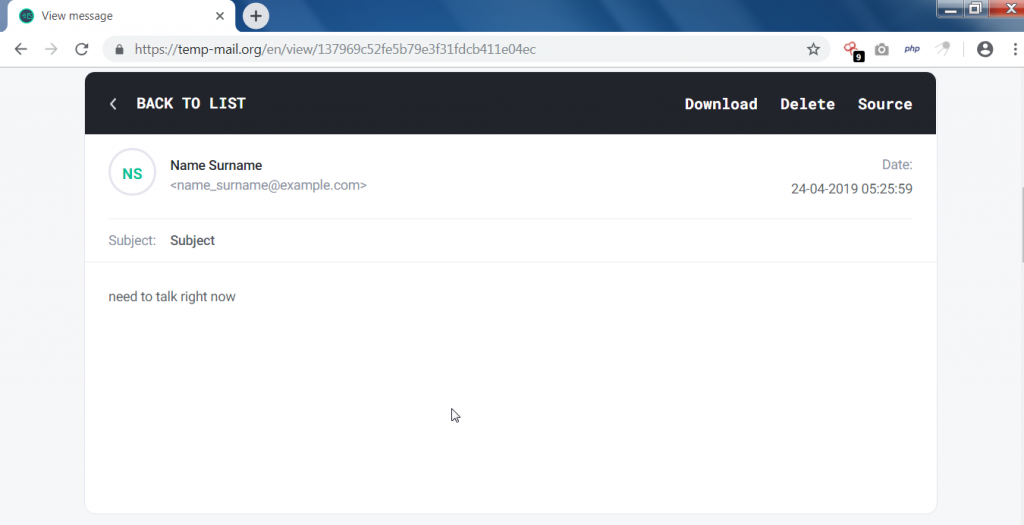
- The above mailbox has received the mail.
ANALYZING TEMPORARY MAIL HEADER:-
- Opening the email header of temporary mail shows the same email address in form & reply:to.
Received: from 127.0.0.1
      by node3 (Haraka/2.8.16) with ESMTP id 5055F1D0-04FF-4831-B67F-CC4EA11CFE35.1
     envelope-from [email protected];
     Wed, 24 Apr 2019 11:55:34 +0000
 Content-Type: multipart/related;
  boundary="===============1127976200482479669=="
 MIME-Version: 1.0
 from: Name Surname [email protected]
 subject: Subject
 reply-to: Name Surname [email protected]
 to: [email protected]

 This is a multi-part message in MIME format.
  --===============1127976200482479669==
 Content-Type: multipart/alternative;
   boundary="===============1585715368107923823=="
 MIME-Version: 1.0

 --===============1585715368107923823==
 Content-Type: text/plain; charset="us-ascii"
 MIME-Version: 1.0
 Content-Transfer-Encoding: 7bit

 This is the alternative plain text message.
 --===============1585715368107923823==
 Content-Type: text/html; charset="us-ascii"
 MIME-Version: 1.0
 Content-Transfer-Encoding: 7bit
 need to talk right now
 --===============1585715368107923823==--
 --===============1127976200482479669==--
- The above shows the same email ID in from & to.
TRACING EMAIL ID:-
- Further, we have traced the above header using an online email tracer. Go to: https://www.iplocation.net/trace-email
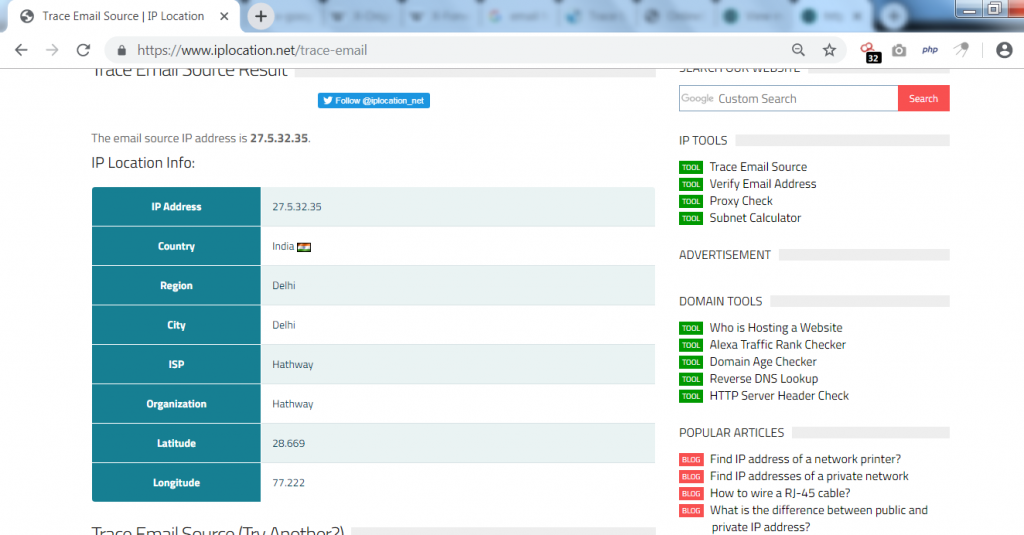
- The email tracer has found the location from where the mail has sent.
