





















In some phases of information gathering. A Pentester is required to scan some of the IP addresses that are most commonly used. As per an ethical hacking researcher at the International Institute of Cyber Security, scanning is the most important phase of penetration testing. The most common addresses can be of routers or search engines. These common scans are used to check normal activities and how the target is using the internet. There are many popular tools like nmap (network mapper) which scans open ports and IP addresses. But today we are talking about Masscan.
According to an ethical hacking researcher at the International Institute of Cyber Security, masscan helps in scanning phases of pentesting/ VAPT.
Masscan is a tool that scans the Internet in a very short time. It uses asynchronous scanning similar to nmap. This tool uses custom ports or IPs to scan targets. Masscan is the fastest tool to scan for open ports. To show you, we have tested on Kali Linux 2018.4 in VMware. We will be scanning local IP addresses, and whole country IPs and will show packet analysis in Wireshark, to check how the Masscan is noisy on the network.
SCANNING LOCAL NETWORKS:-
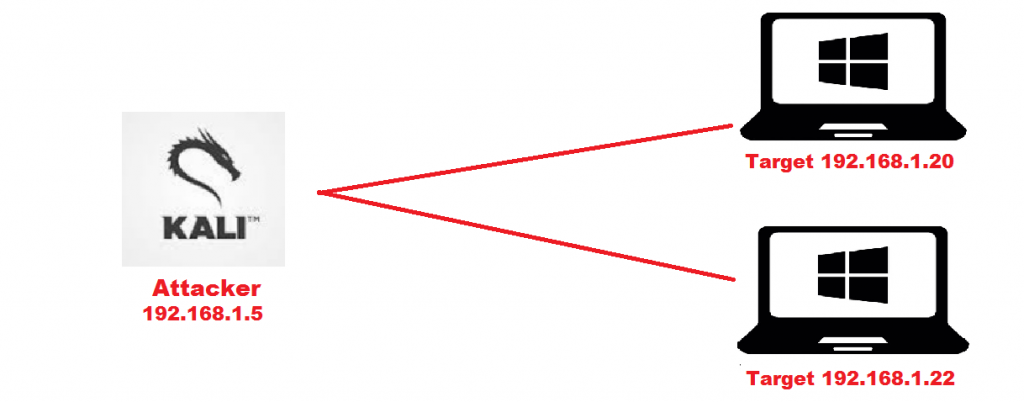
- Here we have created a local network on 3 computers to show you how masscan scan packets. For creating a local network.
- 192.168.1.20 & 192.168.1.22 both are the target machines, both are running on the Windows platform. And attacking machine is the Kali Linux 2018.4
Steps to Configure Your Virtual Machines IPs
- For assigning static IP addresses, go to Control Panel/ Network and Internet/ Network Connections.
- Go to local area connection properties. Go to the IPv4 connection. Enter IP 192.168.1.20
- Replicate the above process with another computer type IP 192.168.1.22
- After creating a local network. You can check by pinging to both IP addresses. Open cmd in both computers and type ping 192.168.1.20 and to another computer ping 192.168.1.22
- Now to make ping from Kali Linux you have to create a virtual network in the vmware.
- Go to Kali Linux network settings and enter static IP. Go to wifi settings select manual type 192.168.1.23 in IPv4 and enter subnet mask 255.255.255.0
- Go to the virtual network editor of VMware in Windows.
- Select the network editor as shown below. Remember to select the appropriate settings.
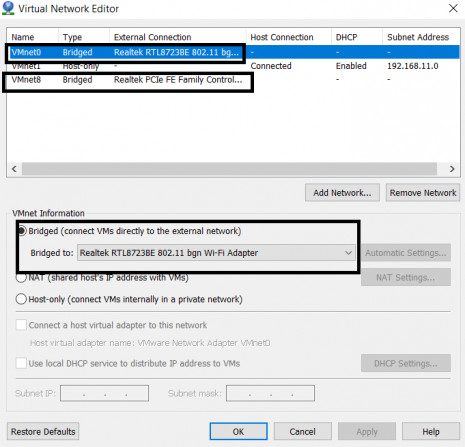
- As shown above, click on Vmnet0 and select the network interface card.
- Then click on Vmnet8 and select local ethernet
- Click on apply and ok
- After assigning Then go to Kali Vmware settings and open network settings. Select the virtual network adapter
Moving to install MASSCAN on KALI
- After assigning static IP addresses to target computers and Kali Linux installs the required library in Kali Linux before using masscan.
- Type sudo apt-get install git gcc make libpcap-dev in Kali Linux terminal.
root@kali:/home/iicybersecurity/Downloads/masscan# sudo apt-get install git gcc make libpcap-dev
 Reading package lists… Done
 Building dependency tree
 Reading state information… Done
 make is already the newest version (4.2.1-1.2).
 make set to manually installed.
 The following package was automatically installed and is no longer required:
   php7.2
 Use 'sudo apt autoremove' to remove it.
 The following additional packages will be installed:
   cpp cpp-8 g++ g++-8 gcc-8 gcc-8-base git-man lib32gcc1 lib32stdc++6 libasan5 libatomic1 libcc1-0 libgcc-8-dev libgcc1 libgfortran5
   libgomp1 libitm1 liblsan0 libmpx2 libobjc-8-dev libobjc4 libpcap0.8-dev libquadmath0 libstdc++-8-dev libstdc++6 libtsan0 libubsan1
 Suggested packages:
   cpp-doc gcc-8-locales g++-multilib g++-8-multilib gcc-8-doc libstdc++6-8-dbg gcc-multilib autoconf automake libtool bison gcc-doc
   gcc-8-multilib libgcc1-dbg libgomp1-dbg libitm1-dbg libatomic1-dbg libasan5-dbg liblsan0-dbg libtsan0-dbg libubsan1-dbg
   libmpx2-dbg libquadmath0-dbg git-daemon-run | git-daemon-sysvinit git-doc git-el git-email git-gui gitk gitweb git-cvs
   git-mediawiki git-svn libstdc++-8-doc
 The following NEW packages will be installed:
   libpcap-dev libpcap0.8-dev
 The following packages will be upgraded:
   cpp cpp-8 g++ g++-8 gcc gcc-8 gcc-8-base git git-man lib32gcc1 lib32stdc++6 libasan5 libatomic1 libcc1-0 libgcc-8-dev libgcc1
   libgfortran5 libgomp1 libitm1 liblsan0 libmpx2 libobjc-8-dev libobjc4 libquadmath0 libstdc++-8-dev libstdc++6 libtsan0 libubsan1
 28 upgraded, 2 newly installed, 0 to remove and 1094 not upgraded.
 Need to get 266 kB/37.1 MB of archives.
 After this operation, 2,753 kB of additional disk space will be used.
 Do you want to continue? [Y/n] Y
 Get:1 http://ftp.yzu.edu.tw/Linux/kali kali-rolling/main amd64 libpcap0.8-dev amd64 1.8.1-6 [240 kB]
 Get:2 http://ftp.yzu.edu.tw/Linux/kali kali-rolling/main amd64 libpcap-dev amd64 1.8.1-6 [25.9 kB]
 Fetched 266 kB in 9s (28.6 kB/s)
 Reading changelogs… Done
 (Reading database … 342760 files and directories currently installed.)
 Preparing to unpack …/0-libquadmath0_8.2.0-13_amd64.deb …
 Unpacking libquadmath0:amd64 (8.2.0-13) over (8.2.0-7) …
 Preparing to unpack …/1-libubsan1_8.2.0-13_amd64.deb …
-------------------------------SNIP------------------------------
 Unpacking libubsan1:amd64 (8.2.0-13) over (8.2.0-7) …
 Preparing to unpack …/2-lib32gcc1_1%3a8.2.0-13_amd64.deb …
 Unpacking lib32gcc1 (1:8.2.0-13) over (1:8.2.0-7) …
 Preparing to unpack …/3-libitm1_8.2.0-13_amd64.deb …
 Unpacking libitm1:amd64 (8.2.0-13) over (8.2.0-7) …
 Preparing to unpack …/4-libgfortran5_8.2.0-13_amd64.deb …
 Unpacking libgfortran5:amd64 (8.2.0-13) over (8.2.0-7) …
 Preparing to unpack …/5-libasan5_8.2.0-13_amd64.deb …
 Unpacking libasan5:amd64 (8.2.0-13) over (8.2.0-7) …
 Preparing to unpack …/6-lib32stdc++6_8.2.0-13_amd64.deb …
 Unpacking lib32stdc++6 (8.2.0-13) over (8.2.0-7) …
 Preparing to unpack …/7-gcc-8-base_8.2.0-13_amd64.deb …
 Unpacking gcc-8-base:amd64 (8.2.0-13) over (8.2.0-7) …
 Setting up gcc-8-base:amd64 (8.2.0-13) …
 (Reading database … 342760 files and directories currently installed.)
 Preparing to unpack …/libstdc++6_8.2.0-13_amd64.deb …
 Unpacking libstdc++6:amd64 (8.2.0-13) over (8.2.0-7) …
 Setting up libstdc++6:amd64 (8.2.0-13) …
 (Reading database … 342760 files and directories currently installed.)
 Preparing to unpack …/00-libgomp1_8.2.0-13_amd64.deb …
 Unpacking libgomp1:amd64 (8.2.0-13) over (8.2.0-7) …
 Preparing to unpack …/01-libatomic1_8.2.0-13_amd64.deb …
 Unpacking libatomic1:amd64 (8.2.0-13) over (8.2.0-7) …
 Preparing to unpack …/02-liblsan0_8.2.0-13_amd64.deb …
 Unpacking liblsan0:amd64 (8.2.0-13) over (8.2.0-7) …
 Preparing to unpack …/03-libtsan0_8.2.0-13_amd64.deb …
 Unpacking libtsan0:amd64 (8.2.0-13) over (8.2.0-7) …
 Preparing to unpack …/04-libmpx2_8.2.0-13_amd64.deb …
 Unpacking libmpx2:amd64 (8.2.0-13) over (8.2.0-7) …
 Preparing to unpack …/05-cpp-8_8.2.0-13_amd64.deb …
 Unpacking cpp-8 (8.2.0-13) over (8.2.0-7) …
 Preparing to unpack …/06-libcc1-0_8.2.0-13_amd64.deb …
 Unpacking libcc1-0:amd64 (8.2.0-13) over (8.2.0-7) …
 Preparing to unpack …/07-gcc-8_8.2.0-13_amd64.deb …
 Unpacking gcc-8 (8.2.0-13) over (8.2.0-7) …
 Preparing to unpack …/08-g++-8_8.2.0-13_amd64.deb …
 Unpacking g++-8 (8.2.0-13) over (8.2.0-7) …
 Preparing to unpack …/1-gcc_4%3a8.2.0-2_amd64.deb …
 Unpacking gcc (4:8.2.0-2) over (4:8.1.0-1) …
 Preparing to unpack …/2-cpp_4%3a8.2.0-2_amd64.deb …
 Unpacking cpp (4:8.2.0-2) over (4:8.1.0-1) …
 Preparing to unpack …/3-git_1%3a2.20.1-1_amd64.deb …
 Unpacking git (1:2.20.1-1) over (1:2.19.1-1) …
 Preparing to unpack …/4-git-man_1%3a2.20.1-1_all.deb …
 Unpacking git-man (1:2.20.1-1) over (1:2.19.1-1) …
- Type git clone https://github.com/robertdavidgraham/masscan.git
root@kali:/home/iicybersecurity/Downloads# git clone https://github.com/robertdavidgraham/masscan.git
 Cloning into 'masscan'…
 remote: Enumerating objects: 20, done.
 remote: Counting objects: 100% (20/20), done.
 remote: Compressing objects: 100% (16/16), done.
 remote: Total 4101 (delta 6), reused 8 (delta 4), pack-reused 4081
 Receiving objects: 100% (4101/4101), 2.56 MiB | 17.00 KiB/s, done.
 Resolving deltas: 100% (2778/2778), done.
- Then type cd masscan
- Type make and then make install
root@kali:/home/iicybersecurity/Downloads/masscan# make
 clang -g -ggdb    -Wall -O3 -c src/crypto-base64.c -o tmp/crypto-base64.o
 clang -g -ggdb    -Wall -O3 -c src/crypto-blackrock2.c -o tmp/crypto-blackrock2.o
 clang -g -ggdb    -Wall -O3 -c src/event-timeout.c -o tmp/event-timeout.o
 clang -g -ggdb    -Wall -O3 -c src/in-binary.c -o tmp/in-binary.o
 clang -g -ggdb    -Wall -O3 -c src/in-filter.c -o tmp/in-filter.o
 clang -g -ggdb    -Wall -O3 -c src/in-report.c -o tmp/in-report.o
 clang -g -ggdb    -Wall -O3 -c src/logger.c -o tmp/logger.o
 clang -g -ggdb    -Wall -O3 -c src/main-conf.c -o tmp/main-conf.o -DGIT=\"1.0.5-51-g6c15edc\"
 clang -g -ggdb    -Wall -O3 -c src/main-dedup.c -o tmp/main-dedup.o
 clang -g -ggdb    -Wall -O3 -c src/main-initadapter.c -o tmp/main-initadapter.o
 clang -g -ggdb    -Wall -O3 -c src/main-listscan.c -o tmp/main-listscan.o
 clang -g -ggdb    -Wall -O3 -c src/main-ptrace.c -o tmp/main-ptrace.o
 clang -g -ggdb    -Wall -O3 -c src/main-readrange.c -o tmp/main-readrange.o
 clang -g -ggdb    -Wall -O3 -c src/main-src.c -o tmp/main-src.o
 clang -g -ggdb    -Wall -O3 -c src/main-status.c -o tmp/main-status.o
 clang -g -ggdb    -Wall -O3 -c src/main-throttle.c -o tmp/main-throttle.o
 clang -g -ggdb    -Wall -O3 -c src/main.c -o tmp/main.o
 src/main.c:282:24: warning: passing 'const struct RangeList *' to parameter of type 'struct RangeList *' discards qualifiers
       [-Wincompatible-pointer-types-discards-qualifiers]
         rangelist_sort(&masscan->targets);
  ---------------------------SNIP---------------------------------
 src/ranges.h:200:34: note: passing argument to parameter 'targets' here
 rangelist_sort(struct RangeList *targets);
                                  ^
 src/main.c:284:24: warning: passing 'const struct RangeList *' to parameter of type 'struct RangeList *' discards qualifiers
       [-Wincompatible-pointer-types-discards-qualifiers]
         rangelist_sort(&masscan->ports);
                        ^~~~~~~
 src/ranges.h:200:34: note: passing argument to parameter 'targets' here
 rangelist_sort(struct RangeList *targets);
                                  ^
 2 warnings generated.
 clang -g -ggdb    -Wall -O3 -c src/masscan-app.c -o tmp/masscan-app.o
 clang -g -ggdb    -Wall -O3 -c src/out-binary.c -o tmp/out-binary.o
 clang -g -ggdb    -Wall -O3 -c src/out-certs.c -o tmp/out-certs.o
 clang -g -ggdb    -Wall -O3 -c src/out-grepable.c -o tmp/out-grepable.o
 clang -g -ggdb    -Wall -O3 -c src/out-json.c -o tmp/out-json.o
 clang -g -ggdb    -Wall -O3 -c src/out-ndjson.c -o tmp/out-ndjson.o
 clang -g -ggdb    -Wall -O3 -c src/out-null.c -o tmp/out-null.o
 clang -g -ggdb    -Wall -O3 -c src/out-redis.c -o tmp/out-redis.o
 clang -g -ggdb    -Wall -O3 -c src/out-tcp-services.c -o tmp/out-tcp-services.o
 clang -g -ggdb    -Wall -O3 -c src/out-text.c -o tmp/out-text.o
 clang -g -ggdb    -Wall -O3 -c src/out-unicornscan.c -o tmp/out-unicornscan.o
 clang -g -ggdb    -Wall -O3 -c src/out-xml.c -o tmp/out-xml.o
 clang -g -ggdb    -Wall -O3 -c src/output.c -o tmp/output.o
 clang -g -ggdb    -Wall -O3 -c src/pixie-backtrace.c -o tmp/pixie-backtrace.o
- Type masscan
root@kali:/home/iicybersecurity/Downloads/masscan# masscan
 usage:
 masscan -p80,8000-8100 10.0.0.0/8 --rate=10000
  scan some web ports on 10.x.x.x at 10kpps
 masscan --nmap
  list those options that are compatible with nmap
 masscan -p80 10.0.0.0/8 --banners -oB
  save results of scan in binary format to
 masscan --open --banners --readscan  -oX
  read binary scan results in  and save them as xml in
- Type masscan to view the help menu.
- Start Wireshark in Kali Linux or the host machine and select Network interface and see the packet analysis.
- If Wireshark is not installed in Kali Linux. Install Wireshark from https://packages.qa.debian.org/w/wireshark.html and for Windows go to https://www.wireshark.org/download.html
SCANNING TARGET COMPUTERS:-
- For scanning type masscan -p0-1000 192.168.1.20 –router-mac <enter mac address>
- 192.168.1.20 is the target computer.
- To know the Mac address open cmd and type getmac in target computers.
- -p is used to enter the port. You can give a port range -p0-5000 or you can specify and ports of your choice.
- –router-mac is used to enter the Mac addresses of the target.
root@kali:/home/iicybersecurity# masscan -p0-1000 192.168.1.20 --router-mac <enter mac addresses>
Starting masscan 1.0.6 (http://bit.ly/14GZzcT) at 2019-01-10 12:03:11 GMT
  -- forced options: -sS -Pn -n --randomize-hosts -v --send-eth
 Initiating SYN Stealth Scan
 Scanning 1 hosts [1001 ports/host]
 Discovered open port 443/tcp on 192.168.1.20
 Discovered open port 135/tcp on 192.168.1.20
 Discovered open port 912/tcp on 192.168.1.20
 Discovered open port 139/tcp on 192.168.1.20
 Discovered open port 445/tcp on 192.168.1.20
 Discovered open port 902/tcp on 192.168.1.20
- After running above query, masscan shows list of open ports in the target operating system. If you start Wireshark in target machine 192.168.1.20 you can see no. of packets retrieving from attacker 192.168.1.5 machine as shown below.
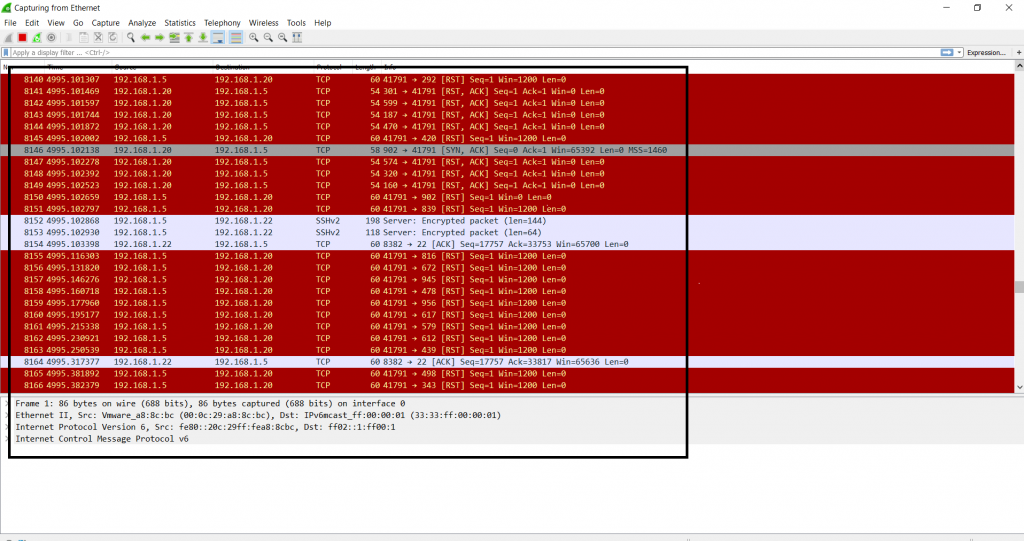
- The above screenshot shows the TCP packet transfer of each packet. The above information can be used in other hacking activities.
- Type masscan -p0-1000 192.168.1.22 –router-mac <enter mac address>
- 192.168.1.22 is the target computer.
- To know the mac address open cmd and type getmac
- -p is used to enter the port. You can give a port range -p0-1000 or you can specify and ports of your choice.
- –router-mac is used to enter the Mac addresses of the target.
root@kali:/home/iicybersecurity# masscan -p0-1000 192.168.1.22 --router-mac <enter mac address>
 Starting masscan 1.0.6 (http://bit.ly/14GZzcT) at 2019-01-10 12:21:21 GMT
  -- forced options: -sS -Pn -n --randomize-hosts -v --send-eth
 Initiating SYN Stealth Scan
 Scanning 1 hosts [1001 ports/host]
 Discovered open port 135/tcp on 192.168.1.22
 Discovered open port 445/tcp on 192.168.1.22
 Discovered open port 139/tcp on 192.168.1.22
- After running the above query, masscan shows a list of ports that are open in the target operating system. The above list can be used to make scenarios for attacking further.
- If you start wireshark in target machine 192.168.1.22 you can see no. of packets retrieving from attacker 192.168.1.5 machine as shown below.
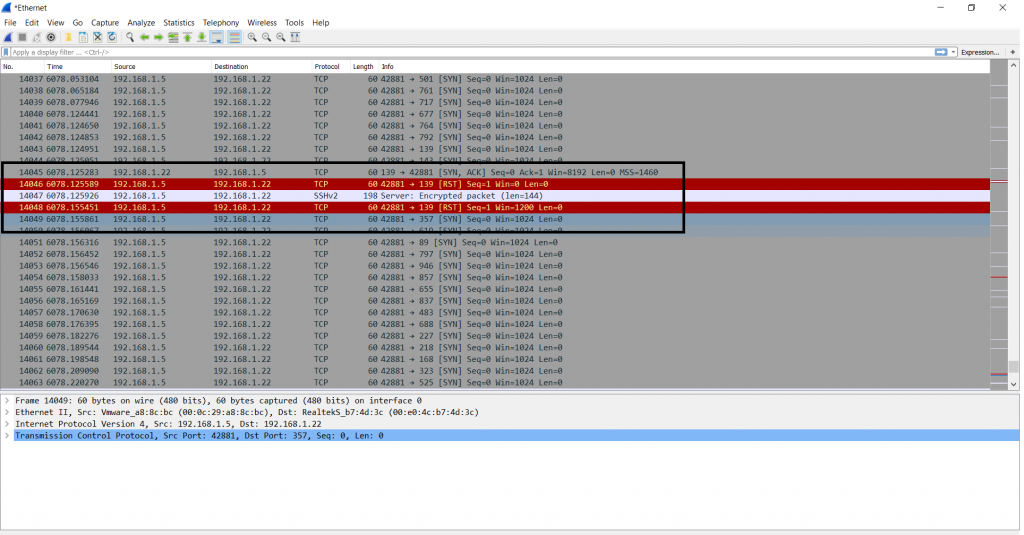
- The above screenshot shows the TCP packet transfer of each packet. As it shows 3-way handshaking.
- The above information can be used in other hacking activities.
SCANNING VULNERABLE IP ADDRESSES:-
- There are many sources where you can use tools for testing. Next, we have used OWASP iso for scanning open ports.
- Owasp iso is most popular for testing your hacking skills.
- For downloading iso go to https://sourceforge.net/projects/owaspbwa/
- After downloading the owasp iso. Open iso in vmware. Simply start iso.
- After starting iso, you will see your IP address as shown below.
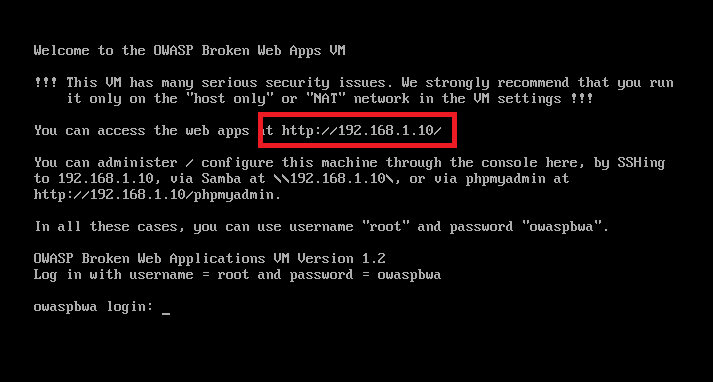
- Enter the IP 192.168.1.10 in a web browser to check if it is working as shown below.

- As you can see, iso is working.
- Now for scanning the above IP address type masscan -p0-8000 192.168.1.10
- -p is used to enter port ranges.
- Then type IP address.
root@kali:/home/iicybersecurity# masscan -p0-8000 192.168.1.10
Starting masscan 1.0.6 (http://bit.ly/14GZzcT) at 2019-01-10 18:11:29 GMT
-- forced options: -sS -Pn -n --randomize-hosts -v --send-eth
Initiating SYN Stealth Scan
Scanning 1 hosts [8001 ports/host]
Discovered open port 445/tcp on 192.168.1.10
Discovered open port 443/tcp on 192.168.1.10
Discovered open port 143/tcp on 192.168.1.10
Discovered open port 80/tcp on 192.168.1.10
Discovered open port 139/tcp on 192.168.1.10
Discovered open port 5001/tcp on 192.168.1.10
Discovered open port 22/tcp on 192.168.1.10
- The above query shows open ports of the target IP address. The above information can be used in other hacking activities.
As explained in the ethical hacking course at the International Institute of Cyber Security, scanning any random IP with a large no, of ports may slow the Kali Linux. Use only limited ports. Or give any short port range. Do not scan any public IP. Your Linux Distros may be hung. If you scan a large no. of ports, your ISP may block you as a large no. of requests is sent to a public IP. Sending Large no. packets may slow the internet.
ANALYZING COUNTRIES IP RANGES :-
- Masscan can scan with different IP ranges & different ports. Here we have taken China country IP ranges. For IP ranges go to : https://lite.ip2location.com/china-ip-address-ranges

- Type masscan -v -sS 43.225.84.0-43.225.87.255 -p0-100
- -v is used to increase verbosity level.
- 17.50.48.0-17.50.55.255 is ip range used in scanning.
- -sS is used to make TCP syn scan always on.
- -p is used to port ranges. we have used -p0-100
root@kali:~/Downloads/masscan# masscan -v -sS 43.225.84.0-43.225.87.255 -p0-100

Starting masscan 1.0.4 (http://bit.ly/14GZzcT) at 2019-04-10 05:28:06 GMT
  -- forced options: -sS -Pn -n --randomize-hosts -v --send-eth
 Initiating SYN Stealth Scan
 Scanning 1024 hosts [101 ports/host]
 THREAD: status: starting thread
 THREAD: xmit: starting thread #0 0:00:00 remaining, found=0
 maxrate = 100.00
 THREAD: recv: starting thread #0
 THREAD: recv: starting main loop
 Discovered open port 53/tcp on 43.225.87.113
 Discovered open port 53/tcp on 43.225.87.45
 Discovered open port 53/tcp on 43.225.87.51
 Discovered open port 80/tcp on 43.225.87.31
 Discovered open port 53/tcp on 43.225.87.39
 Discovered open port 53/tcp on 43.225.87.81
 Discovered open port 53/tcp on 43.225.87.34
 Discovered open port 53/tcp on 43.225.87.104
 Discovered open port 53/tcp on 43.225.87.63
 Discovered open port 53/tcp on 43.225.87.22
 Discovered open port 80/tcp on 43.225.87.195
 Discovered open port 53/tcp on 43.225.87.78
 Discovered open port 53/tcp on 43.225.87.65
 Discovered open port 80/tcp on 43.225.87.69
 Discovered open port 53/tcp on 43.225.87.162
 Discovered open port 80/tcp on 43.225.87.70
 Discovered open port 53/tcp on 43.225.87.133
 Discovered open port 80/tcp on 43.225.87.157
 Discovered open port 80/tcp on 43.225.87.118
 Discovered open port 80/tcp on 43.225.87.55
 Discovered open port 53/tcp on 43.225.87.200
-----------------------------SNIP---------------------------------
 Discovered open port 53/tcp on 43.225.87.163
 Discovered open port 80/tcp on 43.225.87.201
 Discovered open port 53/tcp on 43.225.87.109
 Discovered open port 53/tcp on 43.225.87.59
 Discovered open port 80/tcp on 43.225.87.28
 Discovered open port 53/tcp on 43.225.87.24
 Discovered open port 80/tcp on 43.225.87.160
 Discovered open port 53/tcp on 43.225.87.54
 Discovered open port 80/tcp on 43.225.87.198
 Discovered open port 80/tcp on 43.225.87.187
 Discovered open port 53/tcp on 43.225.87.77
 Discovered open port 53/tcp on 43.225.87.120
 Discovered open port 80/tcp on 43.225.87.72
 Discovered open port 53/tcp on 43.225.87.83
 Discovered open port 53/tcp on 43.225.87.194
- The above query shows the initialization SYN scan, ranging port from 0-100. Thread started from default gateway with maxrate of packets. Here 100 packets are sent by default. You can also send large no. of packets to scan IP ranges.
- Meanwhile, we have also tried to send large no. of packets, but after sending large packets our internet got stuck. Network providers may block your IP address mentioning the ethical hacking professor.
- For sending large no. of packets you need an Intel 10-gbps Ethernet adapter & special driver called PF RING ZC. Download driver from: http://www.ntop.org/products/packet-capture/pf_ring/pf_ring-zc-zero-copy/
- While scanning with given IP ranges. Masscan has found ports 80, and 53 opened in the IP ranges. Port 53 is used for zone transfers (used in DNS enumeration) which can be bypassed by sending UDP packets with port equal to 53.
- While scanning with nmap, it didn’t run with this IP address.
- Type nmap -v 43.225.84.0/255
- -v is used to increase verbosity level.
root@kali:~# nmap -v 43.225.84.0/255
 Starting Nmap 7.70 ( https://nmap.org ) at 2019-04-10 05:45 UTC
 Illegal netmask in "43.225.84.0/255". Assuming /32 (one host)
 Initiating Ping Scan at 05:45
 Scanning 43.225.84.0 [4 ports]
 Completed Ping Scan at 05:45, 3.04s elapsed (1 total hosts)
 Nmap scan report for 43.225.84.0 [host down]
 Read data files from: /usr/bin/../share/nmap
 Note: Host seems down. If it is really up, but blocking our ping probes, try -Pn
 Nmap done: 1 IP address (0 hosts up) scanned in 3.13 seconds
            Raw packets sent: 8 (304B) | Rcvd: 0 (0B)
- Nmap doesn’t scan as we have to use NMAP with the -Pn option, as ping might be blocked explains the ethical hacking professor. So overall MASSCAN is relativelvy faster then NMAP any of the hosts because the target IP address range blocks the port scanner. But in masscan whole IP range was scanned because masscan has its own TCP/IP stack. While Nmap is built on common networking protocols.
