






















Wifi networks are day to day getting popular because of the large demand of internet users. Everyone wants to use the internet. Cheap Wi-fi devices that are capable of connecting large networks help users to search in large databases of the internet. Almost every internet user uses search engines capable of providing content related to search queries. There are many search engines like Google which is always on the top priority when searching any query. But Google does collect a lot of data related to search queries.
According to the ethical hacking researcher of International Institute of Cyber Security, Wigle is useful while scanning for open or free wifi while driving. We can also say that it can be used for wardriving.
Whenever you search for anything on Google. On the last page of Google search results, google shows your location on your computers and on your mobiles. If you turned off your location on your mobile. Then It also shows your Network operator's location, demonstrating the ethical hacking experts.
So How do these search engines collect our location? Today many network devices use the Internet. Companies collect the MAC address of the router to know your location. Normally everyone uses mobiles or laptops to search for anything on the internet. Most of the devices on the internet are connected with Dynamic IP addresses. Because of the large amount of users companies now provide dynamic IP addresses. Dynamic IP addresses is a temporary IP addresses that are assigned to the computers. These IP addresses do not have any long-term validity. So BSSID or you can say the MAC address of your router of collected along with the list of other wifi around you and a list of Public Wi-Fi location databases is created. This helps companies to find our location when we are on Wi-Fi
So Why location are collected? In accordance with ethical hacking courses, companies collect your location to show search results according to your local location. But who knows how these companies are using users' locations. Some other resources say information containing location is sold to other companies. There are many other ways that you can see how these locations are collected, mentions ethical hacking experts. Today we will show another web application & app called Wigle which collects WIFI networks all over the internet. Edward Snowden, a former NSA contractor has said privacy has become a big concern for every individual on the internet as these companies collect each & every location-based search. Earlier we have shown how Shodan & Zommeye are used to collect data by pinging on the internet & can expose vulnerabilities to anyone including your location.
WIGLE (Wireless Geographical Logging Engine) logs/ collects Wifi hotspots all over the internet. The company Wigle started in 2001 and collected 349 million Wifi Hotspots which are running over the internet. Users can register on the site and upload their data. Wigle uses 802.11 wireless networks to collect locations. 802.11 is a standard protocol used to connect Wireless devices on the internet. 802.11 operates 2.4 GHz & 5 GHz bands worldwide. Wigle collects GPS coordinates, MAC addresses, BSSID & encryption used in wireless hotspot security. To visit it GO to : https://wigle.net/

- Opening its URL shows many Wi-fi hotspots on the Wigle map this information can be used in the initial phase of pentesting.
- Many security researchers do rely on Wigle to search or collect local Wifi hotspot information. The tool is mainly used to collect Wifi information while driving.
- Further, it shows the longitude & latitude of its default location.
- One of the main features of Wigle is. It gives an option to get information on your nearby Wifi hotspots on your mobile.
- Currently, application can run on the Android platform.
- Google Play Store: https://play.google.com/store/apps/details?id=net.wigle.wigleandroid&hl=en
- Amazon App Store: https://www.amazon.com/WiGLE-net-Wigle-Wifi-Wardriving/dp/B004L5XBXS
- Simply download & install the WIGLE WIFI Wardriving app on your mobile. The Wigle App has been tested on Android 7.0 Nougat.

- Click on the Wigle icon on your home screen.

- Enable location access on your mobile.

- As you open the app it will ask for permission to access the location & to access local files & folders. Click on Allow as shown below.

- After than app will open & will start scanning for local WIFI networks.

- Wigle has automatically started scanning the local wifi hotspots. Wigle has also ability to show local mobile towers.
- Going to the Wigle App settings can be configured to use Wigle according to your choice.
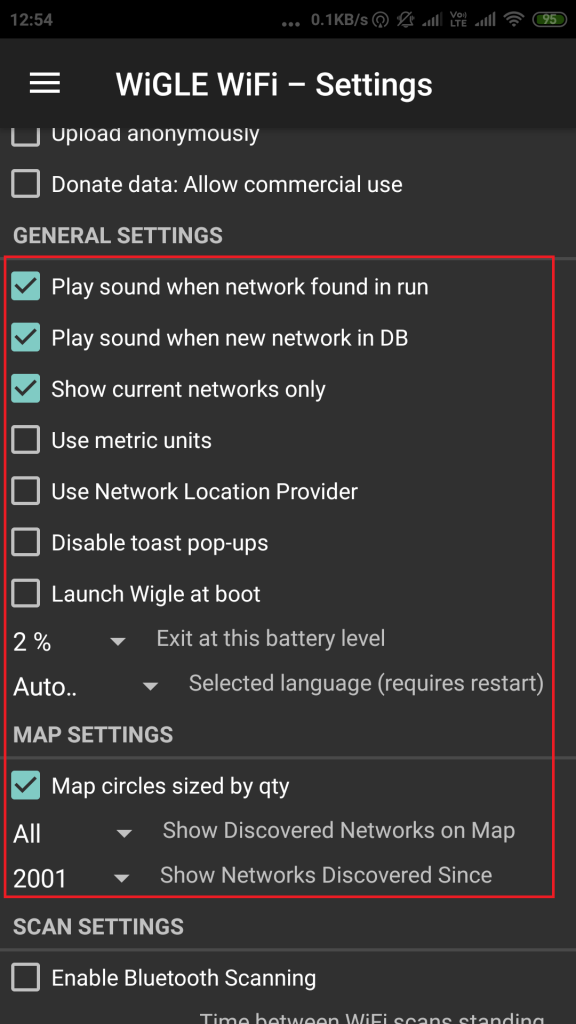
- The above settings show sound settings, battery alerts & other features that can used. By default, all settings are preconfigured & you can use wigle.
- Searching for local Wi-Fi hotspots
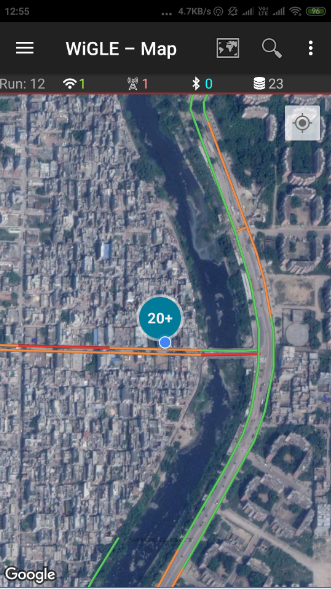
- As shown Wigle has found 20+ Wi-Fi hotspots. When we zoom further wigle has separated all the WIFI hotspots.
- If you click on any particular Wifi hotspot it shows details.
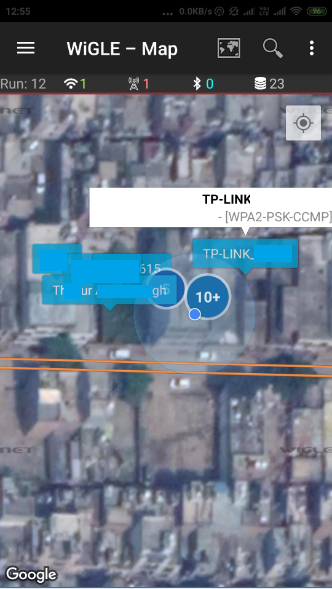
- Wigle can be used to sniff on any particular local Wifi hotspot. Wigle shows details of any Wifi hotspot like a Mac address which can be used in further hacking activities. For all the wifi with security, you can hack wi-fi cracking wpa2 psk passwords using aircrack-ng
- You can also search for any address on the Wigle website. For searching on the website. It is compulsory to create your account. Go to: https://wigle.net/login?destination=/mapsearch

