






















INFOGA INTRO:- Infoga is the tool designed for gathering the email information of the company/target. This tool is written in Python. Infoga gathers information from different search engines like Google, Yahoo, Baidu, etc. Infoga looks simple but very effective, say ethical hacking professionals. This tool is considered in the early stages of pentesting or just to know the visibility of the company/target on the internet.
According to an ethical hacking researcher from the International Institute of Cyber Security infoga is used in information gathering and using that information in other hacking activities.
- This tool does not come pre-installed in Kali Linux. So to install infoga go to
the github link:- https://github.com/m4ll0k/Infoga.git
- Open the terminal in Linux and type: git clone https://github.com/m4ll0k/Infoga.git
- Now go to the Infoga location or where you have installed the Infoga.
- Type cd Infoga
- Then type ls (list the cloned directory contents)
- If the infoga does not start and shows the error of python/pip3 or requests not installed simply type sudo apt-get update to update the python libraries.
- Then type
sudo apt-get install python3-dev/ sudo apt-get install python3-pip (in most cases it require python3 to install).
- After installing the above-required libraries for infoga type python3 infoga.py
________________________________________

Infoga - Email Information Gathering

Momo Outaadi (m4ll0k)

https://github.com/m4ll0k

________________________________________

Usage: infoga.py [OPTIONS]

-d --domain Target URL/Name

-s --source Source data, default "all":

all Use all search engine

google Use google search engine

bing Use bing search engine

yahoo Use yahoo search engine

ask Use ask search engine

baidu Use baidu search engine

dogpile Use dogpile search engine

exalead Use exalead search engine

pgp Use pgp search engine

-b --breach Check if email breached

-i --info Get email informations

-v --verbose Verbosity level (1,2 or 3)

-H --help Show this help and exit
- -d domain – enter the target URL/Name that you want to scan.
- -s source – enter the source from where you want to gather the email information.
- -all will use all the search engines provided by the infoga. For gathering information from any particular search engine use search engines like Google, Yahoo, Bing, Ask, Baidu, Dogpile, Exalead, pgp.
- -b breach – enter the target email to check if the email is breached.
- -i info – enter the target email to check the information about the email.
- -v verbose – enter the verbose level 1,2,3 that how deep information of the target you want.
USING ALL THE SEARCH ENGINES:-
- Type python3 infoga.py –domain cia.gov –source all -v 3

============================OUTPUT SNIP========================

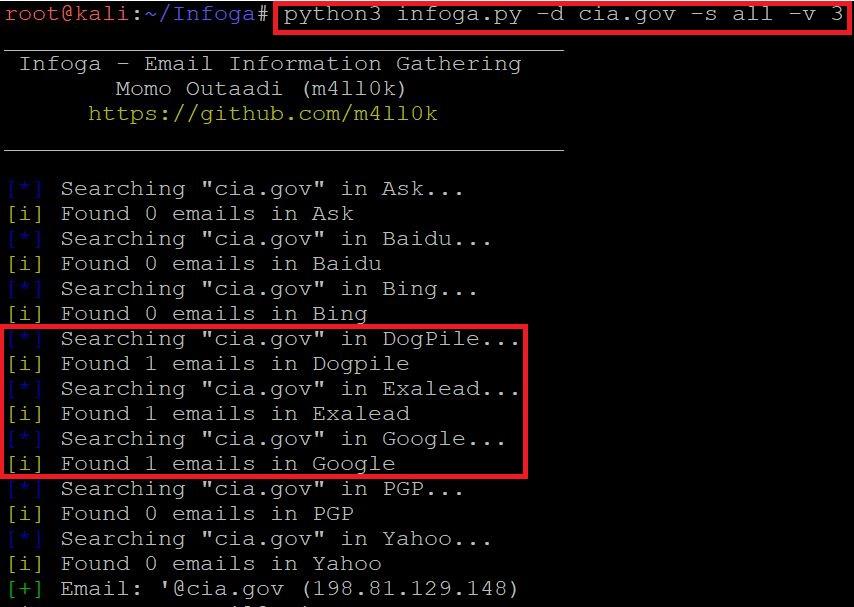
- Type python3 infoga.py -d cia.gov -s all -v 3
=======================OUTPUT SNIP============================

- In the above screenshot, after executing the query for gathering the email information. Infoga has found 2 emails in listed search engines. This information also shows the open ports of the target. It also shows the country, city, hostname, ISP(Internet Service Provider), and shows the map location.
- Open ports vulnerability can be used in SQL injection attacks. Email can also be used in email bombing (overflowing the target mail by sending huge volumes of mail). ASN (Autonomous System Number) can used in attacking on regional internet registry which can result into control of the registration account.
SCANNING THE TARGET WEBSITE USING GOOGLE:-
- Type python3 infoga.py –domain cia.gov –source google –verbose 3 as shown below:-

- Type python3 infoga.py -d cia.gov -s google -v 3

- In the above screenshot, after executing the query for gathering the email information. Infoga has found 2 emails in Google. This information also shows the open ports of the target. It also shows the country, city, hostname, ISP(Internet Service Provider), and shows the map location.
- Open ports vulnerability can be used in SQL injection attacks. Email can also be used in email bombing (overflowing the target mail by sending huge volumes of mail). ASN (Autonomous System Number) can used in attacking on regional internet registry which can result into control of the registration account.
GETTING THE INFORMATION OF THE EMAIL USING GOOGLE:-
- Type python3 infoga.py –info [email protected] –source google -v 3

- Type python3 infoga.py -i [email protected] -s google -v 3

- In the above screenshot after executing the above query infoga scans the email and shows the mail IP address, hostname, country-US, city-Herndon, ISP(Internet Service Provider), and open port information.
- The above information could be used in the information-gathering part. The above information can also be used in brute-force attacks.
USING ALL THE SEARCH ENGINES:-
- Type python3 infoga.py –info [email protected] –source all -v 3

- Type python3 infoga.py -i [email protected] -s all -v 3
- In the above screenshot after executing the above query infoga scans the email and shows the mail IP address, hostname, country-US, city-Herndon, ISP(Internet Service Provider), and open port information.
- The above information could be used in the information-gathering part. The above information can also be used in brute force attacks, according to ethical hacking courses.
CHANGING THE VERBOSE LEVEL:-
- Type python3 infoga.py -d cia.gov -s google -v 3

- In the above screen shot after executing with a high verbose level it will scan the target website more deeper and will show more information like ISP(Internet Service Provider) Map location.
- Type python3 infoga.py -d cia.gov -s google -v 2
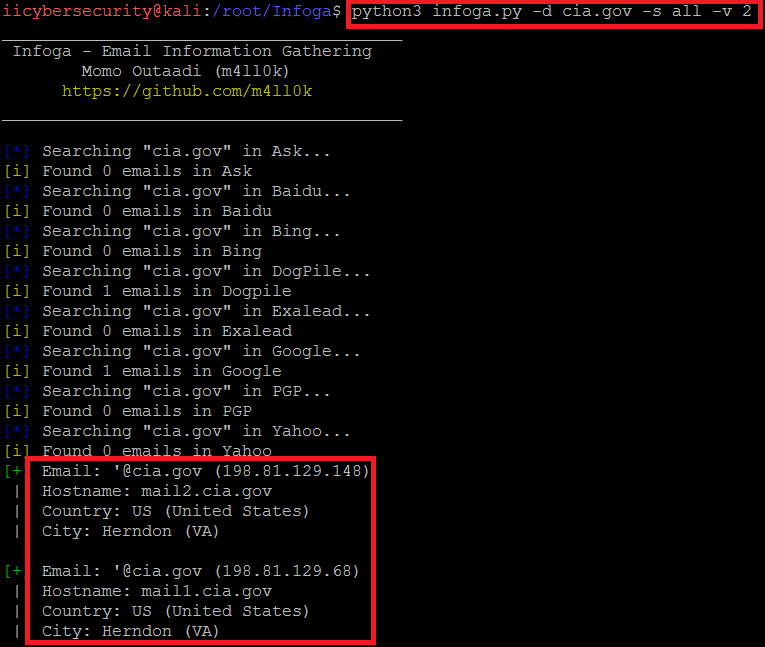
- In the above screen shot after executing with verbose level 2 it will scan the target website and will show only the basic information like mail, hostname, country, and city.
- Type python3 infoga.py -d cia.gov -s google -v 1
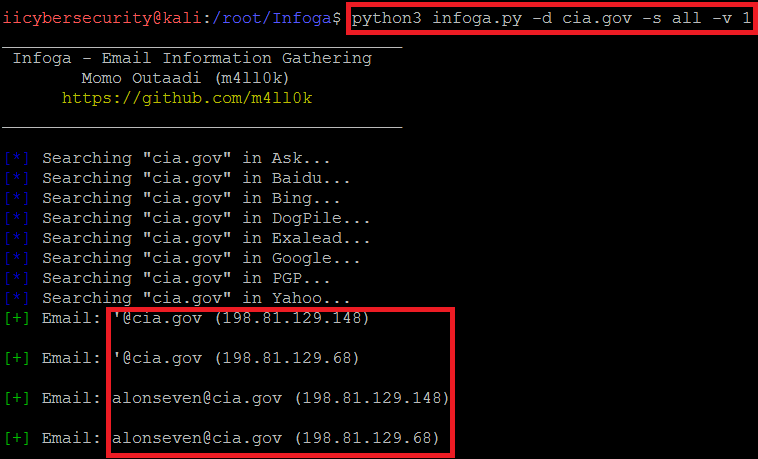
- In the above screenshot after executing the query with verbose level 1. Infoga will show only the target ip address.
