























Everyone would have been well-known for capturing network packets using analyzer tools. But very few have known about capturing with USB packets. We are talking about USB sniffer which is quite often used in ethical hacking courses offered by the International Institute of Cyber Security. USB sniffers capture and show the packets which are transferring.
USB PROTOCOLS:-
USB interface consists of layers of protocol. In the USB interface lower level layers are single-handled. USB packets contain information like:-
- Data exchange
- Controlling the Data exchange
- Error correction & detection
USB CONTAINS DIFFERENT PACKET FIELDS:-
- SYNC – It is an important field holding at the start of the packet. For low and full speed mode, this field is 8 bytes long and 32 bytes high.
- PID – Indicates packet ID. it shows what type of packet is being sent. This field is 8 bits long.
- ADDR – This field stores the destination address of the USB device.
- CRC – Cycle Redundancy Check is used to check for any error in the data packet.
- EOP – End Of Packet Signals the data lines for single-ended zero.
There are two methods to capture USB packets – GUI mode using Wireshark and the CUI mode using USBPcap installer.
- We will test wireshark on Windows 10 with build version 1709.
- Download Wireshark from: https://2.na.dl.wireshark.org/win64/Wireshark-win64-3.0.2.exe
- Install the wireshark. Make sure to install USBPcap while installing Wireshark. If USBPcap does not install, go to: https://github.com/desowin/usbpcap/releases/download/1.2.0.3/USBPcapSetup-1.2.0.3.exe
- Install the USBPcap. After installing Wireshark & USBPcap. Start the Wireshark.

- Click on USBPcap1 & then connect a USB device. Then start copying data from the local computer to a connected USB device.
- As you will start copying the data. You will see the packets transferred from source to destination in Wireshark.

- The above screenshot shows packets transferring from host to destination. The data is transferred to USB Mass Storage. Then data is transferred using the protocol USBMS.
- The USB mass storage is a computing protocol determined by the USB implement Forum. USBMS makes USB devices accessible to the host. USB device works as an external Hard drive.
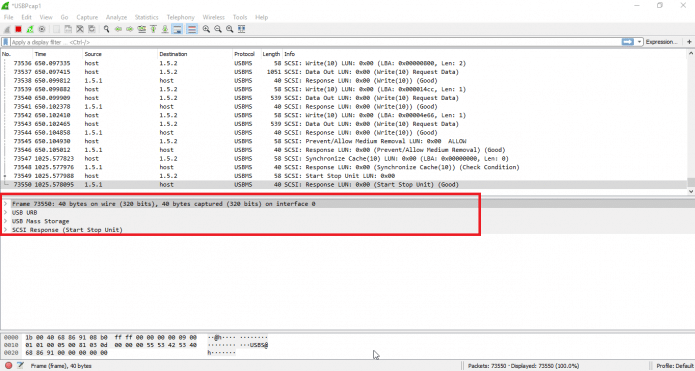
- Now we will analyze the data packet. And we will try to explain each & every information which is shown.
- Firstly it shows the frame. The frame is consisting basic info of the transferring bytes.
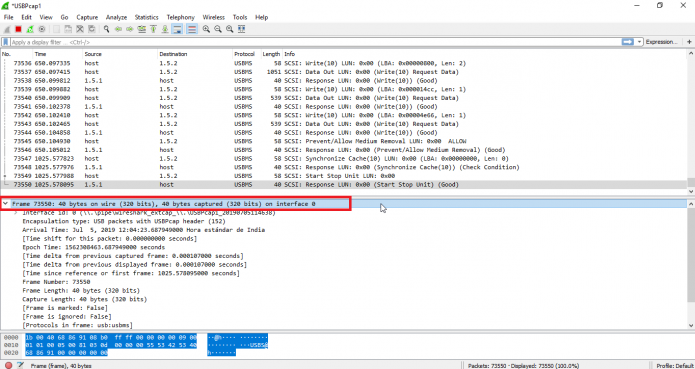
- The above screenshot shows the details about the Frame of 40 bytes. Then it shows the interface ID on which data is captured.
- The frame has info on frame length, frame number & bytes. Then it shows complete time details from the previous captured & displayed frame. All this analysis is part of an ethical hacking course run by the International Institute of Cyber Security.
- Further details show USB URB information which consists of IRP ID and IRP info.
- There are other lightweight packet analyzers like Termshark available on the internet.
