























As per ethical hacking professionals, Nbtstat is a network tool that is used to check the running TCP/IP connections. Nbtstat lists all the network connections that are used in Windows OS. This tool is pre-installed in Windows you do not need to use any external software to run nbtstat. It’s an effective tool to determine all the TCP/IP connections of the Windows machines.
According to the ethical hacking researcher of iicybersecurity, nbtstat can be used in public wifi networks to gather all the IP addresses and use them in fingerprinting or attacking any pubic IP addresses.
- For starting nbtstat.
- Go to the Windows start menu.
- Type cmd.

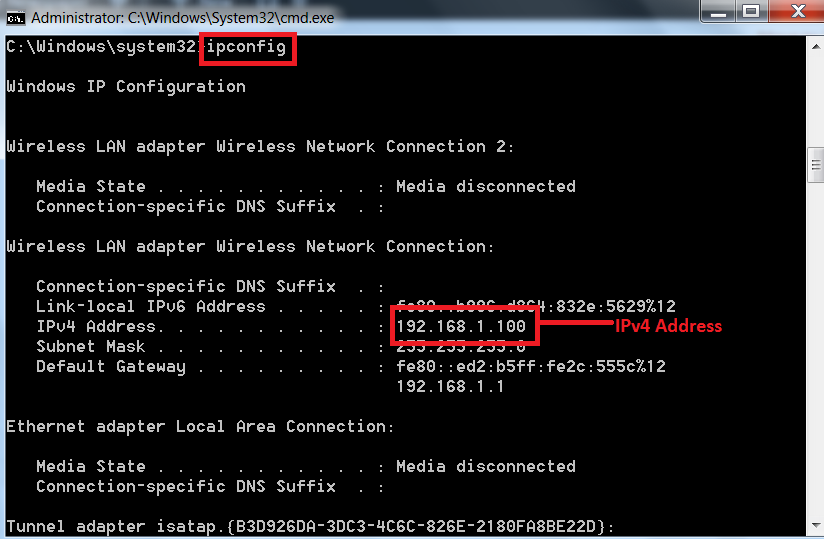
In order to see the TCP/IP connections you must have an IPv4 address to determine TCP/IP connections. You can get IPv4 by following steps:-
- For getting an IPv4
- Type ipconfig in cmd which will list all your IP configuration.
NBTSTAT:-
- For using nbtstat, type NBTSTAT in cmd of Windows machine. Nbtstat options are case-sensitive. please type each command very carefully.
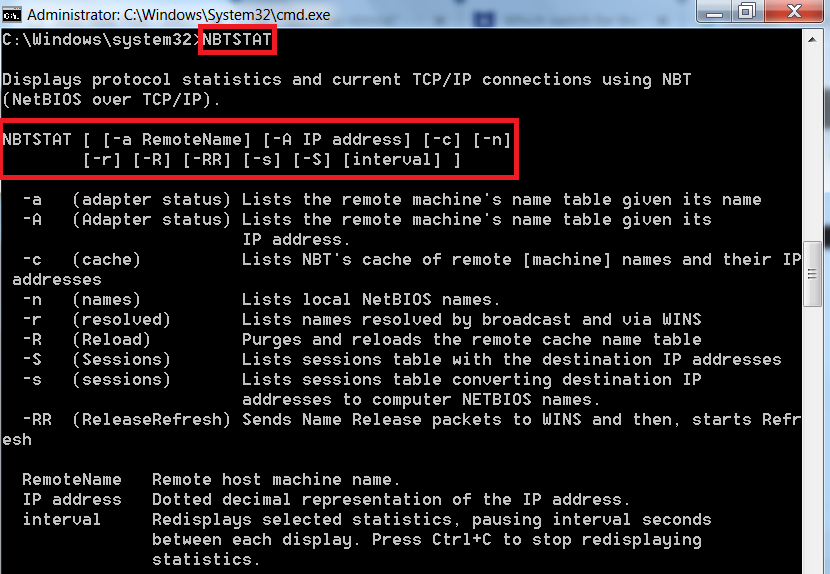
- The above commands can be used to list all the TCP/IP connections in Windows machine.
USING -A / -a option in nbtstat:-
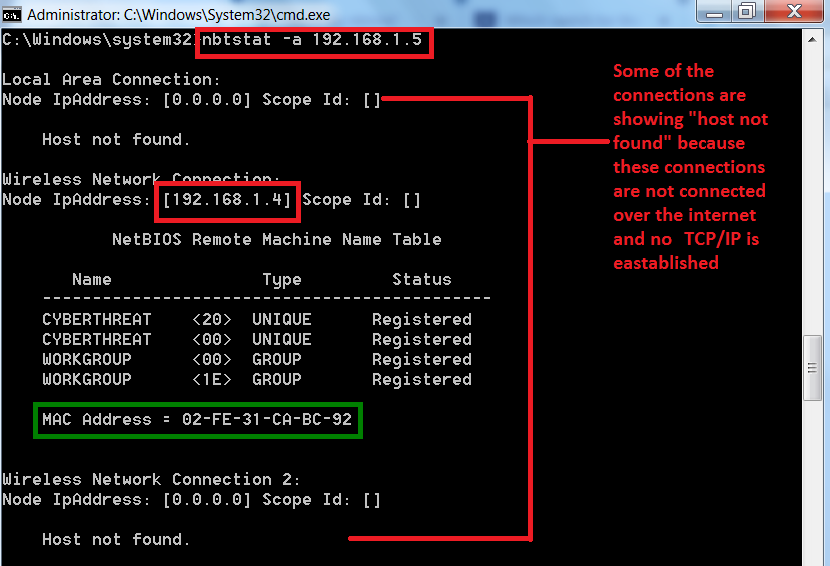
- Command – nbtstat -a / -A <remote name> <Ip address>. If you use <remote name> <IP address> the output will be the same as shown below.
- Type nbtstat -a 192.168.1.5
USING IP ADDRESS (192.168.1.5):-
USING AN REMOTE HOSTNAME (cyberthreat):-
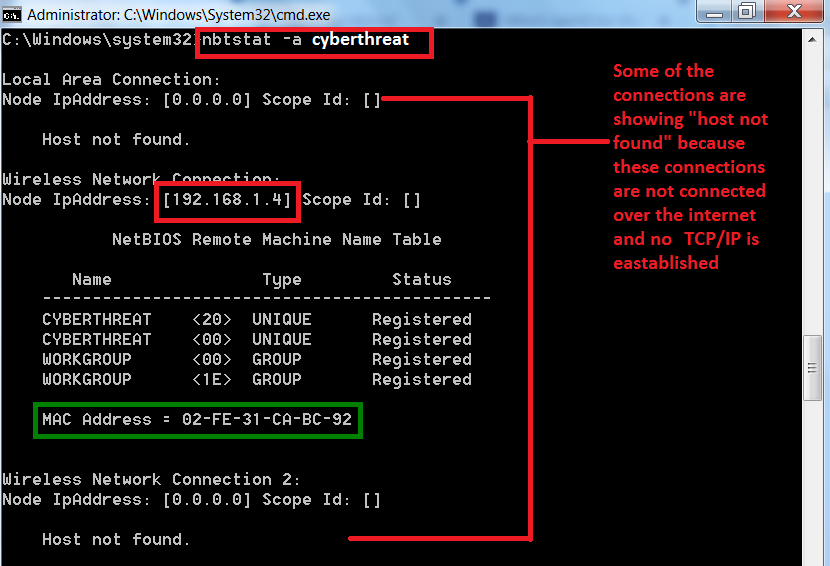
- After scanning the target IP address, the command also provides the mac address.
- The above information especially the Mac address can be used in other hacking activities.
USING -C OPTION IN NBTSTAT:-
- Type nbtstat -c
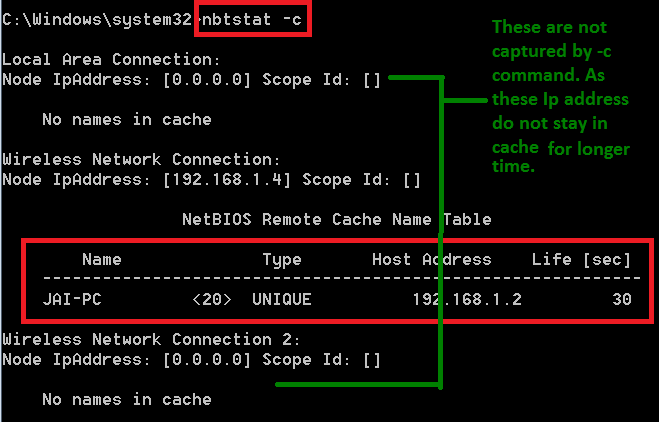
- As you can see, <-c> has returned with the one ip address. The above IP address can be used in exploiting.
- -c option listnbtstat cache table.
REMOTE CACHE NAME TABLE:-

- Jai-Pc (1) is the remote user name.
- Types (2) are used to show IP address it has returned is unique or group. If it is unique that means it's the main PC if it is a group that might be another network adapter that is installed.
- For example, if you installed VMware or Virtualbox both of them will install their own network adapters with different MAC/IP addresses.
- IPv4 (3) Address – 192.168.1.2
- Life (sec) – (4) is showing 220 which means it will expire in 220 seconds.
USING -N OPTION IN NETSTAT:-
- Type nbtstat -n
- <-n> wll list the local netbios names.
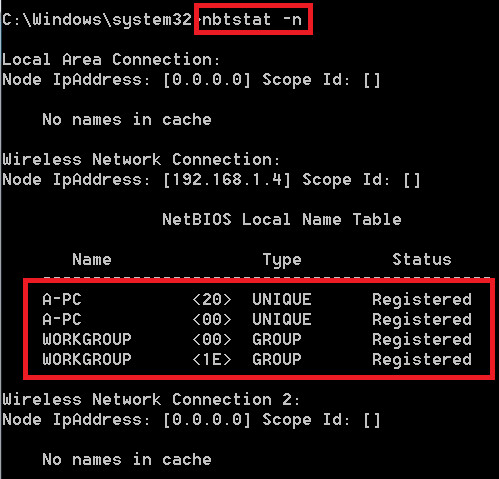
- After executing the above command, -n has returned with local NetBIOS names.
- This is helpful to check your computer netbios names. To know how many network adapters are present.
USING -R OPTION IN NETSTAT :-
- Type nbtstat -r
- <-r> to list names resolved by broadcast and via WINS.

- After executing the above command, -r has listed the broadcast's names.
- This command returns with no. of users who have been configured to use the WINS and registered using the broadcast.
- WINS is used to maintain the mapping of computer names to addresses.
